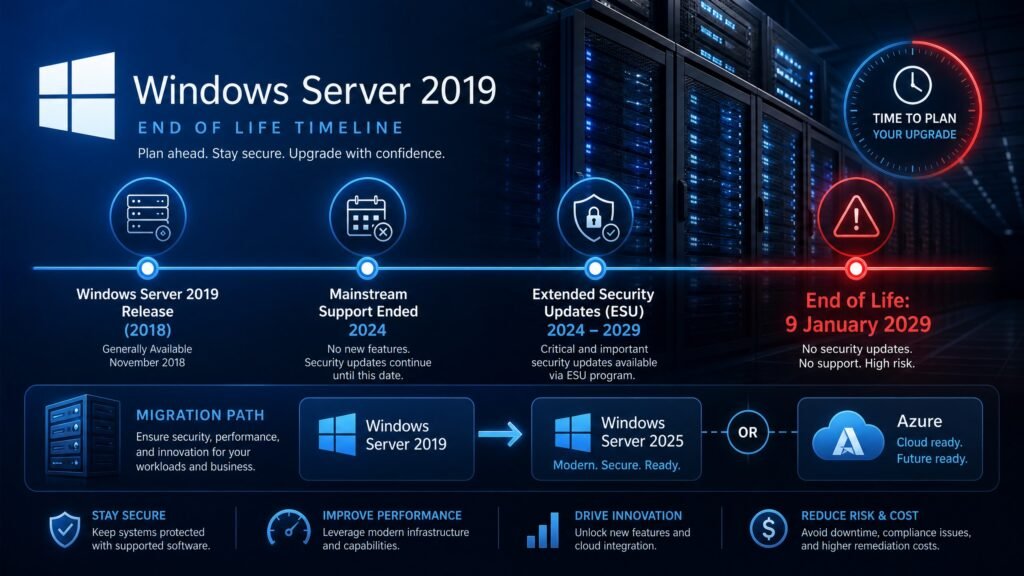
Windows Server 2019 end of life is 9 January 2029. Mainstream support already ended on 9 January 2024, so Server 2019 is currently in its extended support phase — receiving security updates only, with no new features and no non-security bug fixes.
Here is the part most articles get wrong through omission: you are not in a crisis. Server 2019 has security patching until 2029, which is more runway than most Windows Server deployments have. The genuinely urgent deadlines in 2026 belong to Server 2016 (extended support ends January 2027) and Server 2022 (mainstream support ends October 2026). This guide gives you the accurate picture for all of them.
Table of Contents
- Windows Server 2019 end of life: the exact dates
- Mainstream vs extended support explained
- What you get and don’t get right now
- The full Windows Server lifecycle table
- The deadlines that are actually urgent in 2026
- What happens after January 2029
- Why this date gets misreported
- Should you upgrade now or wait?
- Upgrade paths: 2022 or 2025?
- Migration planning checklist
- FAQ
Windows Server 2019 end of life: the exact dates
Two dates matter for windows server 2019 end of life, and conflating them is the source of most confusion.
9 January 2024 — mainstream support ended. New features, non-security bug fixes, design change requests and free incident support all stopped on this date.
9 January 2029 — extended support ends. This is the true Windows Server 2019 end of life. After it, no more security updates and no official technical support.
This follows Microsoft’s Fixed Lifecycle Policy for Long-Term Servicing Channel releases: roughly five years of mainstream support plus five years of extended support, ten years in total. Server 2019 released in October 2018, so the arithmetic works out exactly.
Both editions share the windows server 2019 end of life date. Windows Server 2019 Standard and Windows Server 2019 Datacenter reach end of life together on 9 January 2029, as does Essentials.
Mainstream vs extended support explained
If you take one concept from this guide, take this one — it determines whether Windows Server 2019 end of life is a problem for you today.
Mainstream support is the full package: security updates, non-security bug fixes, new features, and the ability to request design changes.
Extended support is security-only. You still receive every security patch Microsoft issues, delivered through the normal update channels at no additional cost. What you lose is new functionality and fixes for non-security bugs.
The practical implication is reassuring. A Server 2019 machine patched today is not an unpatched machine. It is a supported, secured machine that will not gain new features. For a domain controller, file server or line-of-business application host, that is often precisely what you want.
Where extended support becomes a real constraint: if you need a new capability Microsoft ships only in 2022 or 2025, or if a non-security bug is affecting you, no fix is coming.
Windows Server 2019 end of life: what you get and don’t get now
Concretely, in August 2026, on a Windows Server 2019 installation:
You still get:
- Monthly security updates through Windows Update, WSUS or your patch-management tool
- Full functionality — nothing has been switched off or degraded
- Paid technical support from Microsoft
- Valid licensing; a perpetual Server licence does not expire
You no longer get:
- New features or capabilities
- Non-security bug fixes
- Free support incidents
- Design change requests
You will lose on 9 January 2029: security updates and official support. That is the moment Windows Server 2019 end of life becomes a security and compliance issue rather than a feature limitation.
Windows Server 2019 end of life in context: full lifecycle table
Context matters, because windows server 2019 end of life is only one date among several.
| Version | Mainstream ended / ends | Extended ends (true EOL) | Status in Aug 2026 |
|---|---|---|---|
| Server 2012 / R2 | Oct 2018 / 2018 | Oct 2023 | ❌ Dead — ESU only |
| Server 2016 | 11 Jan 2022 | 12 Jan 2027 | 🔴 Urgent — ~17 months |
| Server 2019 | 9 Jan 2024 | 9 Jan 2029 | 🟡 Secure, plan ahead |
| Server 2022 | 13 Oct 2026 | 14 Oct 2031 | 🟠 Mainstream ends in weeks |
| Server 2025 | ~Oct 2029 | ~Oct 2034 | ✅ Longest runway |
Read that table honestly and the priority order becomes obvious. If you run Server 2016, you have a real deadline. If you run Server 2019, you have time to plan properly. If you run Server 2022, you are about to drop into security-only mode — which is fine, but worth knowing.
The deadlines that are actually urgent in 2026
We would rather tell you which fire to put out first than pretend Windows Server 2019 end of life is the pressing one.
Windows Server 2016 — extended support ends 12 January 2027. This is the genuine emergency in most estates. Roughly seventeen months remain, and enterprise migration projects routinely take longer than that once application compatibility, vendor recertification and change-control windows are counted. If you have 2016 in production, start now.
Windows Server 2022 — mainstream support ends 13 October 2026. About ten weeks away. Nothing breaks; 2022 simply moves into security-only extended support, with patching continuing until October 2031. No panic required, but if you were waiting on a feature, that wait is now permanent.
Windows Server 2012 and 2012 R2 — already past extended support since October 2023. These require paid Extended Security Updates to remain patched at all. If you still run them, this is the highest-risk platform in your environment by a wide margin.
Windows Server 2019 — 9 January 2029. Nearly two and a half years of security patching remain. Plan, budget, and fold it into a hardware refresh. Do not rush it at the expense of the 2016 boxes.
What happens after Windows Server 2019 end of life in January 2029
Nothing switches off at windows server 2019 end of life. That is worth stating plainly, because vendor messaging around end-of-life dates often implies otherwise.
After Windows Server 2019 end of life, your servers keep booting, your services keep running, your applications keep working, and your licences remain valid. What stops is patching. Every vulnerability discovered from January 2029 onward stays open on that machine indefinitely.
For a server — a machine that by definition accepts connections, often from outside your network — that is a materially worse position than an unpatched desktop. Servers are targeted deliberately and continuously.
Extended Security Updates (ESU) exist as a paid bridge. Microsoft’s ESU programme provides critical and important security updates for up to three years after the extended support end date, and can be delivered through Azure Arc for on-premises machines. It buys time; it is not a strategy. Treat ESU as a way to finish a migration that is already underway, not as an alternative to one.
Compliance is the other consideration. Frameworks such as PCI DSS, HIPAA, SOC 2 and ISO 27001 expect supported and patched systems. Running an unsupported server OS is difficult to defend to an auditor and increasingly difficult to defend to a cyber-insurer.
Why the Windows Server 2019 end of life date gets misreported
Search results for this topic contradict each other constantly, and there are three reasons worth understanding so you can judge any source you read.
The two-date structure. Some articles quote 9 January 2024 as the Windows Server 2019 end of life date. That was the mainstream support end, not end of life. Others quote only 2029 without mentioning that new features and non-security fixes stopped years ago. Both halves matter.
Confusion with Windows 10. Windows 10 and Windows Server 2019 share a codebase generation, and Windows 10 reached end of support on 14 October 2025. That date does not apply to Server 2019, but it appears in plenty of articles that conflate the two.
ESU misunderstandings. You will find claims that Server 2019 already requires paid Extended Security Updates to receive patches. It does not. Extended support security updates are included at no extra cost until January 2029; ESU is the separate paid programme that becomes relevant only afterwards.
How to verify any date yourself
Do not take our word for it, or anyone else’s. Microsoft publishes a searchable lifecycle database, and every product page lists the release date, mainstream end date and extended end date in one place.
Search Microsoft Lifecycle for your exact product and edition, and check the dates against whatever you have been told. This takes two minutes and has saved more than one IT budget from being spent a year too early — or a year too late.
Should you upgrade now or wait?
Honest, case by case.
Upgrade now if: you run Server 2016 anywhere, you are already planning a hardware refresh, you need features only in 2022 or 2025 (hotpatching, modernised Active Directory, improved storage and SMB security), or your compliance framework requires mainstream-supported software.
Plan for 2027–2028 if: your Server 2019 workloads are stable, your applications are certified only for 2019, patching is current, and there is no business driver forcing the change. You have the time — use it to test properly rather than migrating in a hurry.
Do not delay past 2028 if: the environment is complex, multiple line-of-business applications need vendor recertification, or you have a small IT team. Enterprise upgrade projects consistently take longer than planned, and 2029 arrives faster from the middle of a migration than from the start of one.
The pattern we see repeatedly: organisations treat Windows Server 2019 end of life as distant, do nothing for two years, then discover in late 2028 that a critical application vendor has not certified anything newer.
Windows Server 2019 end of life upgrade paths: 2022 or 2025?
Both are valid answers to windows server 2019 end of life. The choice is about runway versus caution.
Windows Server 2025 reached general availability in November 2024 and is the current LTSC release, with support running to roughly October 2034. It brings hotpatching, modernised Active Directory, improved Hyper-V and stronger security defaults. Note that hotpatching moved to a paid subscription model in 2026, so factor that in if it is part of your reasoning.
Windows Server 2022 is the lower-risk step, patched until October 2031, with a large installed base and mature vendor certification. Its mainstream support ends in October 2026, so you would be adopting a platform already in security-only mode.
Our recommendation for most organisations upgrading from 2019: go straight to Server 2025. Migrating to 2022 buys you two fewer years and costs the same testing effort, so a two-step upgrade rarely pays for itself. Choose 2022 only when a specific application vendor certifies 2022 but not yet 2025 — which does happen, and is a legitimate reason.
For a detailed feature-by-feature breakdown, see our comparison of Windows Server 2019 vs 2022 vs 2025.
Windows Server 2019 end of life migration checklist
Work through this in order. Starting your windows server 2019 end of life planning in 2026 rather than 2028 is the whole difference.
- Inventory every server. Version, edition, role, core count, and whether it is physical or virtual. You cannot plan what you have not listed.
- Identify the 2016 machines first. They have a January 2027 deadline and take priority over anything to do with Windows Server 2019 end of life.
- List every application per server and check each vendor’s supported OS matrix. This is the step that derails projects when skipped.
- Check hardware. Server 2025 has higher requirements than 2019; some older physical servers will need replacing rather than upgrading.
- Count your cores and CALs. Windows Server is licensed per physical core with a minimum of 16 per server, plus client access licences for users or devices. Budget both.
- Decide in-place upgrade or clean install. In-place is faster but carries more risk; clean installation on new hardware with a migration of roles is cleaner and is what most teams choose for domain controllers.
- Test in a lab first. Build one server, migrate one role, run your applications against it.
- Sequence the rollout. Least critical workloads first; domain controllers and database servers last.
- Keep Server 2019 patched throughout. It is still receiving security updates until 2029 — do not let patching lapse during a migration.
- Diary the next dates: January 2027 for any remaining 2016, January 2029 for 2019, October 2031 for 2022.
Get genuine Windows Server licences at Kymakers
Genuine one-time-purchase Windows Server keys: legally sourced, tested before delivery, activated on Microsoft’s own servers, delivered by email within minutes, with a money-back guarantee.
- Windows Server 2025 Standard 16 Core — longest support runway, to around 2034: https://kymakers.shop/product/windows-server-2025-standard-16-core-product-key/
- Windows Server 2025 Datacenter 16 Core — unlimited virtualisation: https://kymakers.shop/product/windows-server-2025-datacenter-16-core-product-key/
- Windows Server 2022 Standard 16 Core — the conservative step, patched to 2031: https://kymakers.shop/product/windows-server-2022-standard-16-core-product-key/
- Windows Server 2022 Datacenter 32 Core: https://kymakers.shop/product/windows-server-2022-datacenter-32-core/
- RDS User CALs (2022 and 2025): https://kymakers.shop/product/windows-server-2025-rds-50-user-cal/
- Browse all Windows Server licences: https://kymakers.shop/product-category/windows-server/
We also still stock Windows Server 2019 Standard and Datacenter, and here is our honest position on them. With security updates until January 2029, Server 2019 remains a legitimate purchase for a specific compatibility requirement, a lab, or an application certified only for that version.
As the platform for a new production deployment in 2026, though, Server 2025 is the better decision — more runway, better security defaults, same licensing model. We would rather say that than take the cheaper sale.
Microsoft’s own lifecycle documentation confirms every date used in this guide, and is worth checking directly before you commit budget.
Windows Server 2019 end of life FAQ
When is Windows Server 2019 end of life? 9 January 2029, when extended support ends. Mainstream support already ended on 9 January 2024, so the product is currently in security-only extended support.
Is Windows Server 2019 still supported in 2026? Yes. It receives security updates through extended support until January 2029, at no additional cost. It does not receive new features or non-security bug fixes.
Do I need to pay for extended support on Server 2019? No. Extended support security updates are included and delivered through the normal update channels. Paid Extended Security Updates only become relevant after January 2029.
Will my servers stop working after Windows Server 2019 end of life? No. Everything keeps running and your licences stay valid. Security patching stops, which is the real risk — servers are targeted continuously, so unpatched vulnerabilities accumulate.
Which Windows Server version should I upgrade to? Server 2025 for most organisations, supported to roughly 2034. Choose Server 2022 only if an application vendor certifies 2022 but not yet 2025.
Is Windows Server 2016 more urgent than Windows Server 2019 end of life? Yes, considerably. Server 2016 extended support ends 12 January 2027 — about seventeen months away. Deal with 2016 machines before touching 2019.
What happens to Windows Server 2022 in October 2026? Its mainstream support ends on 13 October 2026 and it moves into extended support, with security updates continuing until 14 October 2031. Nothing breaks.
Can I upgrade Server 2019 in place to Server 2025? In-place upgrades are supported across adjacent versions, but a clean installation with role migration is safer and is what most teams do for domain controllers. Test in a lab before committing either way.
Written by the KYMakers Technical Team. Technically reviewed by a Microsoft licensing specialist. Last updated: 2 August 2026. Sources: Microsoft Lifecycle, Microsoft Support, Microsoft Fixed Lifecycle Policy. KYMakers sells genuine, one-time-purchase Microsoft license keys with instant email delivery.