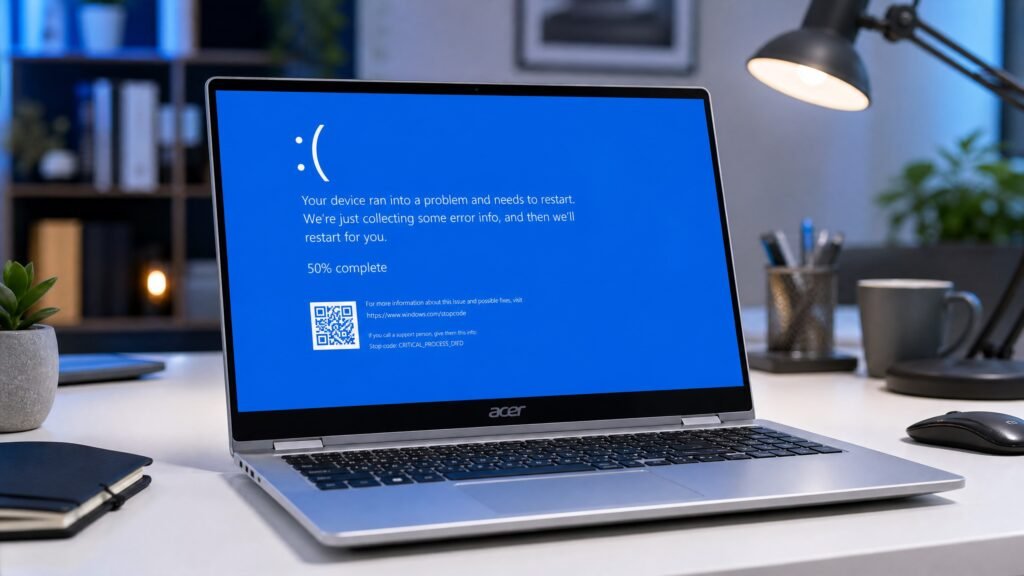
A blue screen Acer crash is Windows shutting itself down to prevent damage after a critical error — almost always a driver problem, faulty RAM, disk corruption or overheating. The fastest fix: note the stop code shown on screen, boot into Safe Mode, then update or roll back the graphics and chipset drivers. That resolves the majority of cases on Aspire, Swift, Nitro and Predator machines.
One thing that confuses people in 2026: on Windows 11 version 24H2 and later, that screen is black, not blue. Microsoft replaced the classic Blue Screen of Death with a Black Screen of Death in update KB5062660, rolled out broadly from August 2025. Same crash, same stop codes, different colour — so if your Acer shows a black crash screen, everything in this guide still applies.
Table of Contents
- What a blue screen Acer crash actually means
- Blue screen or black screen? The 2026 change explained
- Read your stop code first
- Common causes on Acer laptops specifically
- Step-by-step fixes (in order)
- Blue screen Acer issues by model family
- When it is hardware, not software
- Reinstalling Windows as a last resort
- How to prevent it happening again
- FAQ
What a blue screen Acer crash actually means
A blue screen Acer stop error is not your laptop breaking. It is Windows deliberately halting because continuing would risk data corruption or hardware damage.
Something asked the Windows kernel to do something impossible — a driver tried to write to protected memory, a disk read failed mid-operation, a RAM cell returned garbage. Rather than carry on and corrupt your files, Windows stops, records what happened in a dump file, and restarts.
This is why blue screen Acer crashes are usually fixable. The underlying cause is a specific component or driver, and the stop code tells you which one. Random, unexplained crashes are rare; crashes with a traceable cause are the norm.
Blue screen or black screen? The 2026 change explained
If your blue screen Acer crash appears black instead, nothing is wrong with your laptop.
Microsoft shipped update KB5062660 for Windows 11 24H2 in July 2025, bringing systems to build 26100.4770, and it replaced the blue background with black. The redesign also removed the sad face and the QR code. What remains is a short message — your device ran into a problem and needs to restart — plus the stop code and, usefully, the name of the faulty driver.
That last part is an improvement. Older blue screens often left you guessing; the new screen frequently names the culprit outright. The change is purely visual and technical behaviour is identical, so blue screen Acer troubleshooting steps have not changed at all.
Windows 10 machines still show the traditional blue version, with the sad face and QR code.
Read your stop code first
Do not skip this. Every blue screen Acer fix below is faster if you know the code.
The stop code appears on the crash screen as text like DRIVER_IRQL_NOT_LESS_OR_EQUAL or a hex value like 0x0000007E. Photograph it with your phone before the laptop restarts — the screen often disappears in seconds.
| Stop code | Usual cause | Where to start |
|---|---|---|
| DRIVER_IRQL_NOT_LESS_OR_EQUAL | Faulty driver (often network or graphics) | Fix 3 — drivers |
| VIDEO_TDR_FAILURE | Graphics driver crash | Fix 3 — graphics driver |
| MEMORY_MANAGEMENT | Bad RAM or memory driver | Fix 6 — memory test |
| PAGE_FAULT_IN_NONPAGED_AREA | RAM or driver referencing bad memory | Fix 6, then Fix 3 |
| CRITICAL_PROCESS_DIED | Corrupted system files | Fix 5 — SFC and DISM |
| INACCESSIBLE_BOOT_DEVICE | Storage driver or disk problem | Fix 7 — disk check |
| KERNEL_SECURITY_CHECK_FAILURE | Driver conflict or corrupt files | Fix 3, then Fix 5 |
| SYSTEM_SERVICE_EXCEPTION | Driver or system service fault | Fix 3 |
| WHEA_UNCORRECTABLE_ERROR | Hardware fault or overheating | Fix 8 — hardware |
If you missed the code, find it afterwards: press Windows key + X, open Event Viewer, then Windows Logs → System, and look for a critical error at the time of the crash. Or install the free BlueScreenView utility from its developer’s official site to read the dump files.
Common causes of blue screen Acer crashes specifically
Acer machines are ordinary Windows PCs, but a few blue screen Acer causes come up disproportionately on them.
Graphics drivers. By far the most common. Many Acer models pair Intel or AMD integrated graphics with an Nvidia GPU, and switchable-graphics conflicts are a classic trigger — especially after a Windows update installs a generic driver over the manufacturer’s tested version.
Acer’s own utilities. Acer Care Center, Quick Access and Acer Product Registration are helpful but occasionally conflict after major Windows updates. If crashes began right after an update, these are worth testing by temporarily disabling them.
RAM seating and quality. Aspire and Swift models are frequently upgraded with third-party RAM. A stick that is slightly unseated, mismatched, or simply faulty produces MEMORY_MANAGEMENT and PAGE_FAULT errors. This is the single most common cause on machines that have been opened.
Overheating. Nitro and Predator gaming laptops push hard under load, and dust-clogged fans lead to thermal-related WHEA errors. A crash that only ever happens during gaming is a strong overheating signal.
Storage failure. An ageing hard drive or a failing SSD produces INACCESSIBLE_BOOT_DEVICE and random corruption crashes.
Windows updates. A bad cumulative update genuinely does cause blue screen Acer crashes occasionally. If yours started the day after an update, uninstalling that update is a legitimate first move.
Fast Startup. Acer’s default Fast Startup setting can conflict with certain drivers, producing crashes on wake rather than on boot.
Step-by-step fixes, in order
Work down the list. Stop when the blue screen Acer crashes stop.
Fix 1 — Restart and confirm the blue screen Acer crash repeats
A single stop error is not a pattern. Restart, use the laptop normally, and see if it recurs. One-off crashes caused by a transient fault need no action at all.
If it repeats, note whether there is a trigger — gaming, waking from sleep, plugging in a device, opening a specific app. That pattern narrows the cause faster than any tool.
Fix 2 — Boot into Safe Mode
Safe Mode loads Windows with minimal drivers, which tells you immediately whether a driver is behind your blue screen Acer crashes.
If your Acer still boots: hold Shift while clicking Restart, then choose Troubleshoot → Advanced options → Startup Settings → Restart → press 4.
If it will not boot at all: power off with the power button three times during startup and Windows enters Automatic Repair, from where you can reach the same menu.
If Safe Mode is stable, a driver or startup program is your culprit. That single data point saves hours.
Fix 3 — Update or roll back drivers (the main blue screen Acer fix)
This resolves most blue screen Acer cases, so give it proper attention.
For graphics, download the driver directly from the correct source rather than letting Windows choose: Nvidia, AMD or Intel for the GPU, and Acer’s own support site for chipset, touchpad, card reader and Wi-Fi drivers — Acer’s versions are tested against your exact model.
If crashes started after a driver update, roll back instead: press Windows key + X → Device Manager, expand the device, right-click → Properties → Driver tab → Roll Back Driver.
Prioritise in this order: display adapters, network adapters, storage controllers, then everything else.
Fix 4 — Uninstall a recent Windows update
If the timing of your blue screen Acer crashes points at an update, remove it. Go to Settings → Windows Update → Update history → Uninstall updates, and remove the most recent cumulative update.
Then pause updates for a few weeks so it does not immediately reinstall. Our guide on how to stop Windows updates covers the safe ways to do that without leaving yourself unpatched indefinitely.
Fix 5 — Repair system files with SFC and DISM
Corrupted system files cause CRITICAL_PROCESS_DIED and similar blue screen Acer errors. Open Command Prompt as Administrator and run:
sfc /scannowLet it reach 100%. If it reports unrepaired problems, run:
DISM /Online /Cleanup-Image /RestoreHealthThen run sfc /scannow once more and restart. This pairing fixes a surprising share of otherwise mysterious crashes.
Fix 6 — Test your RAM for blue screen Acer memory errors
Essential if you see MEMORY_MANAGEMENT or PAGE_FAULT_IN_NONPAGED_AREA.
Press Windows key + S, type Windows Memory Diagnostic, and choose to restart and check for problems. The test runs before Windows loads and takes 10–30 minutes.
For a more thorough test, MemTest86 run from a USB stick is the standard tool — let it complete at least four passes.
If you have upgraded the RAM yourself, physically reseat it: power off, remove the battery if removable, open the panel, remove and firmly reinsert each stick. If there are two sticks, test with one at a time to identify a bad one.
Fix 7 — Check the disk
For INACCESSIBLE_BOOT_DEVICE or random corruption, run in an Administrator Command Prompt:
chkdsk C: /f /rIt will schedule itself for the next restart and can take hours on a mechanical drive — leave it plugged in and let it finish.
Also check the drive’s health with CrystalDiskInfo or the manufacturer’s own tool. A “Caution” status on an SSD means back up immediately; failing storage is the one cause on this list that gets worse on its own.
Fix 8 — Address overheating
If blue screen Acer crashes only happen under load, treat this as thermal.
Monitor temperatures with HWMonitor while gaming. Sustained CPU or GPU temperatures above roughly 95°C indicate a cooling problem. Clean the vents and fans with compressed air, elevate the laptop for airflow, and on a machine more than three years old consider having the thermal paste replaced.
Nitro and Predator owners: use Acer’s own performance profiles rather than forcing maximum fan curves through third-party tools, which occasionally conflict with Acer’s firmware.
Fix 9 — System Restore
If the crashes began recently and you cannot identify what changed, roll the whole system back. Search for Create a restore point → System Restore, and choose a point dated before the problems started. Your files are untouched; drivers and system changes are reverted.
Fix 10 — Update the BIOS
Worth doing only if Acer’s support page lists a BIOS update that specifically mentions stability, and only after the steps above have failed. Download it from Acer’s official support site for your exact model, plug into mains power, and do not interrupt it. A failed BIOS flash is far worse than a blue screen.
Blue screen Acer issues by model family
Blue screen Acer patterns differ across the range, and knowing yours helps.
Aspire. The most common family and the most commonly upgraded. RAM and storage upgrades make memory-related stop codes the leading suspect here.
Swift. Thin and light, with soldered RAM on many models — so suspect drivers and thermal throttling before memory.
Nitro and Predator. Gaming machines with hybrid graphics and high sustained loads. Graphics-driver conflicts and overheating dominate. Crashes exclusively during games point firmly at one of those two.
Spin. Convertibles add touchscreen and sensor drivers to the mix, which occasionally cause crashes on rotation or wake.
TravelMate. Business machines, often with corporate management software layered on. If it is a work laptop, involve IT before changing drivers — some crashes trace to security software you cannot simply remove.
Chromebook. Acer Chromebooks run ChromeOS and cannot produce a Windows stop error at all. A crash there is a different problem entirely.
When a blue screen Acer problem is hardware, not software
Be honest with yourself at this point, because continuing to reinstall software will not help a failing component.
Signs the problem is physical:
- Crashes continue in Safe Mode, or even during a fresh Windows installation
- Memory diagnostics report errors on multiple passes
- The disk reports a Caution or Bad health status
- Crashes correlate strictly with temperature under load
- The laptop crashes before Windows even loads
- Different stop codes appear each time, apparently at random
That last one is telling. Consistent codes suggest software; a scattergun of different codes usually means RAM or storage is failing.
If your Acer is under warranty, contact Acer support before opening anything. If not, RAM and storage are the two components a competent local repair shop replaces cheaply — and they are the two most likely culprits.
Reinstalling Windows as a last resort for blue screen Acer crashes
When software fixes are exhausted and the hardware tests clean, a clean installation eliminates every software variable at once.
Back up your files first — to an external drive or cloud storage — because a clean install erases the drive. Then create installation media with Microsoft’s Media Creation Tool on another PC; our guide to creating a bootable Windows USB walks through it step by step.
A note on activation, since it catches people out. Most Acer laptops have a digital licence stored in the motherboard firmware, so Windows reactivates automatically after a reinstall with no key needed — choose “I don’t have a product key” during setup and let it sort itself out. If activation does not complete, our guides on finding your Windows 10 product key and Windows 11 activation cover every scenario.
You only need to buy a licence in specific situations: the motherboard was replaced, the laptop arrived without Windows, or you are moving from a Home to a Pro edition.
Get a genuine Windows licence if you need one
Genuine one-time-purchase Windows keys: legally sourced, tested before delivery, activated on Microsoft’s own servers, delivered by email within minutes, with a money-back guarantee.
- Windows 11 Pro product key: https://kymakers.shop/product/microsoft-windows-11-pro-product-key/
- Windows 11 Home product key: https://kymakers.shop/product/microsoft-windows-11-home-product-key/
- Windows 11 Home to Pro upgrade key: https://kymakers.shop/product/windows-11-home-to-pro-upgrade-key/
- Browse all Windows 11 editions: https://kymakers.shop/product-category/windows/windows-11/
To be clear: if your Acer already has a digital licence, you do not need to buy anything to reinstall Windows. We would rather tell you that than sell you a key you already own. Before upgrading, check our Windows 11 requirements guide — TPM 2.0 and Secure Boot are the usual blockers on older Acer models. Microsoft’s own stop-error troubleshooting documentation is also worth reading for the technical detail behind specific codes.
How to prevent blue screen Acer crashes
Most repeat blue screen Acer crashes are preventable with a handful of habits.
Get drivers from Acer’s support site or the GPU vendor, not from driver-updater utilities, which are a common source of mismatched versions. Install Windows updates, but wait a week or two on optional feature updates rather than taking them on day one.
Keep the vents clean — a can of compressed air twice a year genuinely extends the life of a laptop. Avoid running the machine on soft surfaces that block airflow. If you upgrade RAM, buy matched sticks from the compatibility list for your model and seat them firmly.
And keep backups. Not because crashes destroy files often, but because the one cause that gets worse on its own — a failing drive — gives very little warning.
Blue screen Acer FAQ
Why does my Acer laptop keep showing a blue screen? Repeated crashes almost always trace to a driver conflict, faulty RAM, disk corruption or overheating. Photograph the stop code, then work through Safe Mode and driver updates first.
Why is my Acer crash screen black instead of blue? Microsoft replaced the Blue Screen of Death with a black version in Windows 11 24H2 via update KB5062660, rolled out from August 2025. It is the same error screen with a new colour, and the same fixes apply.
Can a blue screen Acer crash damage my laptop? No. The stop error is Windows protecting the system by halting. The crash itself causes no damage, though the underlying cause — failing RAM or a dying drive — can cause data loss if ignored.
How do I find out what caused my blue screen Acer crash? Note the stop code from the screen, then check Event Viewer under Windows Logs → System for a critical error at that time. BlueScreenView reads the dump files and names the responsible driver.
Will reinstalling Windows fix a blue screen Acer problem? It fixes software causes such as corrupted files, driver conflicts and bad updates. It will not fix faulty RAM, a failing disk or overheating, so test the hardware before reinstalling.
Do I need a new Windows key after reinstalling on my Acer? Usually not. Most Acer laptops carry a digital licence in the motherboard firmware, so Windows reactivates automatically. You only need a key if the motherboard was replaced or the machine never had Windows licensed.
Is a blue screen Acer problem covered by warranty? If the cause is a hardware fault such as failing RAM or storage, yes, while the laptop is in warranty. Software causes and third-party RAM you installed yourself are generally not covered.
How can I stop Acer blue screens after a Windows update? Uninstall the most recent update under Settings → Windows Update → Update history → Uninstall updates, then pause updates for a couple of weeks and reinstall once a fix has shipped.
Written by the KYMakers Technical Team. Technically reviewed by a Microsoft licensing specialist. Last updated: 2 August 2026. Sources: Microsoft Learn, Microsoft Support, Microsoft Update Catalog. KYMakers sells genuine, one-time-purchase Microsoft license keys with instant email delivery.