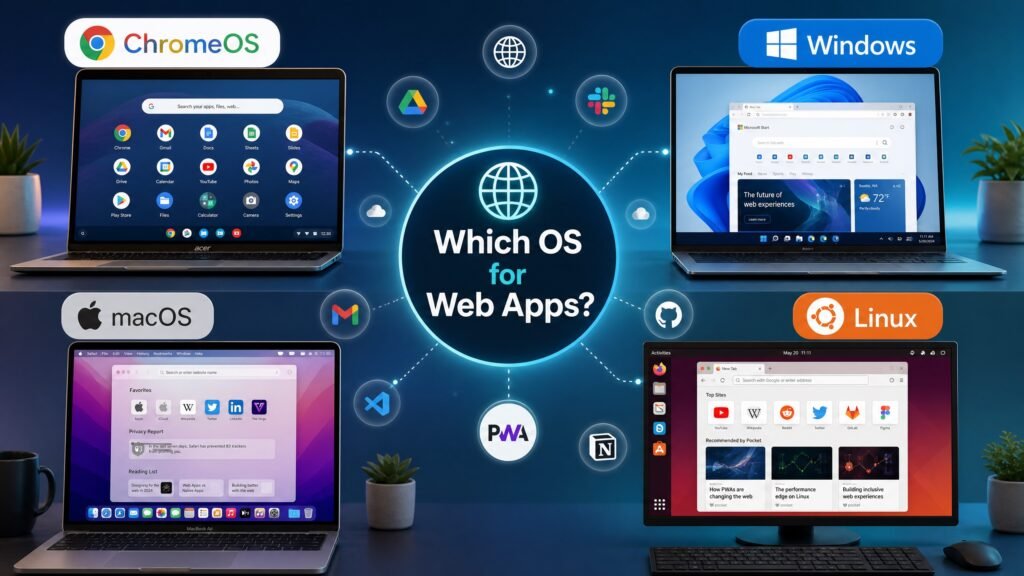
The short answer to which operating system is optimized for web apps is ChromeOS. Google built it around the browser rather than around installed software: the browser is the desktop, web apps and Progressive Web Apps are first-class citizens, and everything else — file manager, settings, updates — is built to serve that model.
That is the textbook answer, and if you are here for an exam or certification question, it is the one you want. But it answers only half of what most people actually mean. If your real question is which operating system should I use to build web apps, ChromeOS is close to the worst choice, and the honest answer is Windows 11, macOS or Linux. This guide covers both readings properly.
Table of Contents
- The short answer, and why the question splits in two
- Why the answer is ChromeOS
- What ChromeOS cannot do
- Which operating system is optimized for web apps when you are building them?
- Comparison table: OS for web development
- Windows 11 for web development
- Windows 11 Home vs Pro for developers
- macOS and Linux honestly assessed
- Which OS is best for simply using web apps?
- What about the server side?
- FAQ
The short answer, and why the question splits in two
Ask which operating system is optimized for web apps and you get two legitimate answers depending on what you mean by “for”.
Optimized to run web apps as its primary purpose: ChromeOS. No other mainstream desktop OS is architected around the browser as the main application layer.
Optimized to develop web apps: Windows 11, macOS or Linux — all three, for different reasons. This is what developers, students on practical courses, and anyone buying a machine actually needs to know.
Certification exams and quizzes asking which operating system is optimized for web apps almost always want the first answer. Real purchasing decisions almost always concern the second. Confusing the two is why this question generates so much contradictory advice online.
Which operating system is optimized for web apps? Why it is ChromeOS
Understanding the architecture explains which operating system is optimized for web apps better than a list of features does.
ChromeOS runs a Linux kernel underneath, but the user-facing layer is the Chrome browser. Applications are web applications by default, and there is no traditional installer ecosystem to manage. That design choice produces several genuine advantages:
- Instant boot and low overhead. Because the OS does not load a heavy desktop application stack, Chromebooks start in seconds and run acceptably on modest hardware.
- Progressive Web App support. PWAs install like native apps, get their own windows and icons, and can work offline. ChromeOS treats them as equals rather than as second-class browser tabs.
- Sandboxing and verified boot. Each tab and app is isolated, and the OS verifies its own integrity at startup. This is why Chromebooks have a strong security record.
- Automatic background updates. No patch-Tuesday ritual and no version-upgrade project.
- Android app support. Most modern Chromebooks run Android apps, filling gaps where no good web app exists.
- Linux development environment. ChromeOS can run a Linux container for basic development work.
So when a course asks which operating system is optimized for web apps, ChromeOS is correct by design intent, not by benchmark. It is the only mainstream OS where a web app is the native format.
What ChromeOS cannot do
This is where the textbook answer to which operating system is optimized for web apps stops being useful, and where honesty matters more than a tidy conclusion.
ChromeOS cannot run full desktop Windows software. Desktop Microsoft Office, Adobe’s professional suite, most engineering and CAD tools, and the majority of PC games simply do not exist for it. The web versions of Office and Photoshop are capable but genuinely reduced compared with their desktop counterparts.
Offline capability is better than its reputation but still narrower than a conventional OS. And while the built-in Linux container allows some development, it is constrained by hardware and by the container model — serious local development on a Chromebook is possible but rarely pleasant.
The practical summary: ChromeOS is excellent for consuming web apps and poor for producing them.
Which operating system is optimized for web apps when you are building them?
Here the answer to which operating system is optimized for web apps changes completely, and this is the version of the question worth spending money on.
Modern web development means running Node.js, package managers, Docker containers, local databases, build tools and multiple browsers simultaneously — often alongside a code editor and a dozen browser tabs. What matters is not browser-first design but toolchain support, Unix compatibility, hardware choice and cost.
On those criteria, three operating systems compete seriously, and ChromeOS is not among them.
Which operating system is optimized for web apps: comparison table
| Windows 11 | macOS | Linux | ChromeOS | |
|---|---|---|---|---|
| Node, npm, Git | ✅ Excellent | ✅ Excellent | ✅ Excellent | ⚠️ Via container |
| Docker | ✅ Via WSL 2 | ✅ Native | ✅ Native | ❌ Impractical |
| Unix-like shell | ✅ Via WSL 2 | ✅ Native | ✅ Native | ⚠️ Container only |
| Test in Safari | ❌ No | ✅ Yes | ❌ No | ❌ No |
| Test in Chrome, Edge, Firefox | ✅ All | ✅ All | ✅ All | ✅ Chrome only |
| Hardware choice | ✅ Widest | ❌ Apple only | ✅ Widest | ⚠️ Limited |
| Cost of entry | 💲 Low–mid | 💲💲💲 High | 💲 Free OS | 💲 Low |
| Matches production servers | ⚠️ Via WSL | ⚠️ Close | ✅ Exact | ❌ No |
| Runs desktop Office, Adobe | ✅ Yes | ✅ Yes | ❌ No | ❌ No |
No column wins outright. Which operating system is optimized for web apps in your case depends on which row you cannot compromise on.
Windows 11: which operating system is optimized for web apps on a budget
Windows became a credible web development platform for one reason: WSL 2, the Windows Subsystem for Linux. It runs a real Linux kernel alongside Windows, so you get genuine Linux tooling — bash, apt, native Node performance, Docker — without dual booting or a virtual machine you have to manage.
What that gives you in practice:
- A real Ubuntu (or other distribution) shell, integrated with your Windows file system
- Docker Desktop using the WSL 2 backend, which is faster than the older Hyper-V backend
- Visual Studio Code with WSL integration, editing Linux files in a Windows editor seamlessly
- Chrome, Edge and Firefox for cross-browser testing, plus the widest hardware range at every price point
The two real limitations are honest ones. You cannot test in Safari on Windows — no Safari build exists, and for a public-facing site that matters, so you will need a Mac, a cloud testing service or a borrowed device. And path and line-ending differences between Windows and Linux occasionally cause friction, though WSL 2 removes most of it.
For most people asking which operating system is optimized for web apps development on a budget, Windows 11 with WSL 2 is the pragmatic answer: near-Linux capability, full desktop software compatibility, and hardware from any manufacturer.
Windows 11 Home vs Pro for developers
Once you have settled which operating system is optimized for web apps, the edition question follows. This deserves care, because it is easy to oversell Pro and we would rather be accurate.
What Home does fine: WSL 2, Node.js, Git, VS Code, every browser, local databases — and Docker Desktop via the WSL 2 backend. Docker Home support has been the case for years now; the old restriction existed because the original Hyper-V backend required Pro, and the WSL 2 backend removed it.
One caveat worth knowing: Docker’s own system-requirements documentation still lists Pro, Enterprise or Education for some configurations, while multiple current installation guides and Docker’s WSL 2 documentation describe Home working normally. If you are on Home and Docker refuses to start, the cause is almost always hardware virtualisation disabled in BIOS/UEFI rather than your Windows edition — check the Virtualization line in Task Manager → Performance → CPU first.
What genuinely requires Pro:
- Hyper-V — for running full virtual machines, or the Hyper-V Docker backend
- Windows Sandbox — a disposable Windows instance, excellent for testing untrusted code
- BitLocker — full-drive encryption, which matters if you hold client code or credentials
- Remote Desktop host — connecting to your dev machine from elsewhere
- Group Policy — fine-grained system control
So: a hobbyist or student learning web development does not need Pro, and we will say so plainly. A professional developer handling client work, running VMs, or wanting encrypted storage and remote access into their machine does. Our full Windows 11 Home vs Pro comparison breaks down every difference if you want the detail.
macOS and Linux: which operating system is optimized for web apps at the top end
macOS is the most popular answer to which operating system is optimized for web apps among professional developers, and the reasons are real: a Unix foundation, so most server tooling works natively; Safari and iOS Simulator for testing Apple browsers, which nothing else provides; excellent battery life and displays on Apple Silicon; and native Docker.
The costs are equally real. Hardware starts high and you cannot choose your own. Some tools remain Intel-first. And you are locked to one vendor’s roadmap.
Linux is the purist’s answer, and technically the strongest on one specific axis: it matches your production servers exactly, since the overwhelming majority of web hosting runs Linux. It is free, fast on old hardware, and gives complete control.
The friction is hardware and ecosystem. Wi-Fi, graphics, sleep behaviour and fingerprint readers still need occasional troubleshooting depending on the laptop. And desktop Office, Adobe and many commercial design tools are unavailable, so a designer-developer often cannot make Linux their only machine.
Which OS is best for simply using web apps?
If you only use web apps and are asking which operating system is optimized for web apps for that purpose — Gmail, Google Docs, Microsoft 365 online, Notion, Figma, Canva, a CRM — then the answer flips again, and it is refreshingly boring: almost any modern operating system is fine.
What actually determines the experience is the browser and the hardware, not the OS. A current Chrome, Edge or Firefox on Windows 11, macOS, Linux or ChromeOS renders the same web app the same way. RAM matters far more than OS choice: 8 GB is workable, 16 GB is comfortable if you keep many tabs open.
Which operating system is optimized for web apps in this scenario is therefore a question with a slightly deflating answer — for pure web-app use, ChromeOS is the cheapest and lightest route, and everything else works equally well while also running desktop software when you need it.
Which operating system is optimized for web apps on the server?
Worth a brief mention, because which operating system is optimized for web apps sometimes means “which OS should host my web app”.
Linux hosts the large majority of web servers, and for good reason: it is free, stable, resource-efficient, and every major web stack targets it first. Nginx, Apache, Node, Python, PHP, Ruby, PostgreSQL and MySQL are all Linux-native.
Windows Server is the right answer in one specific circumstance: an application built on the classic .NET Framework, IIS, Active Directory integration or Microsoft SQL Server. Modern .NET runs on Linux too, but plenty of enterprise applications remain tied to the Windows stack. If that is your situation, our comparison of Windows Server 2019 vs 2022 vs 2025 covers which version to choose.
For a new project with no legacy constraints, Linux on the server and whichever desktop OS you prefer for development is the default in 2026.
Get a genuine Windows 11 licence at Kymakers
Genuine one-time-purchase Windows keys: legally sourced, tested before delivery, activated on Microsoft’s own servers, delivered by email within minutes, with a money-back guarantee.
- Windows 11 Pro product key — Hyper-V, Sandbox, BitLocker and Remote Desktop for professional development: https://kymakers.shop/product/microsoft-windows-11-pro-product-key/
- Windows 11 Home product key — everything a student or hobbyist needs for WSL 2 and web development: https://kymakers.shop/product/microsoft-windows-11-home-product-key/
- Windows 11 Home to Pro upgrade key — already on Home and now need Hyper-V or BitLocker: https://kymakers.shop/product/windows-11-home-to-pro-upgrade-key/
- Browse all Windows 11 editions: https://kymakers.shop/product-category/windows/windows-11/
To be clear about what we are not claiming: Windows is not objectively the answer to which operating system is optimized for web apps in every case, and if you already own a Mac or run Linux happily, changing platform for its own sake would be a waste of money. Where Windows wins is breadth — full desktop software, WSL 2 for Linux tooling, and hardware at any budget.
Before installing, check our Windows 11 requirements guide, since TPM 2.0 and Secure Boot block many older machines. Docker’s own Windows installation documentation is worth reading alongside this for the current system requirements.
Which operating system is optimized for web apps — FAQ
Which operating system is optimized for web apps? ChromeOS. It is built around the Chrome browser as its application layer, treats web apps and PWAs as native, and has no traditional desktop software ecosystem. This is the answer certification exams expect.
If ChromeOS answers which operating system is optimized for web apps, is it good for development? Not really. It runs a Linux container for basic work, but hardware limits and the container model make serious local development awkward. Use Windows, macOS or Linux instead.
Which operating system is optimized for web apps development in 2026? Windows 11 with WSL 2 for the best balance of capability and cost, macOS if you must test in Safari, Linux if matching your production server exactly matters most.
Do I need Windows 11 Pro for web development? No, for most people. Home handles WSL 2, Node, Git, VS Code and Docker via the WSL 2 backend. Pro adds Hyper-V, Windows Sandbox, BitLocker and Remote Desktop host, which matter for professional and client work.
Can I run Docker on Windows 11 Home? Yes, using the WSL 2 backend. The old Pro-only restriction applied to the Hyper-V backend. If Docker will not start on Home, check that hardware virtualisation is enabled in BIOS/UEFI before blaming your edition.
Why can’t I test Safari on Windows? Apple discontinued Safari for Windows in 2012 and no current version exists. Use a Mac, a borrowed iPhone or iPad, or a cloud browser-testing service.
Between Linux and Windows, which operating system is optimized for web apps? For matching production servers, yes — most web hosting is Linux. For hardware compatibility, desktop software availability and ease of setup, Windows 11 with WSL 2 is usually smoother.
Which OS should I choose if I just use web apps all day? Any modern one. Browser and RAM matter far more than the operating system. ChromeOS is the cheapest route for purely web-based work; Windows or macOS make sense if you also need desktop applications.
Written by the KYMakers Editorial Team. Technically reviewed by a Microsoft licensing specialist. Last updated: 2 August 2026. Sources: Docker documentation, Microsoft Learn, Google ChromeOS documentation. KYMakers sells genuine, one-time-purchase Microsoft license keys with instant email delivery.