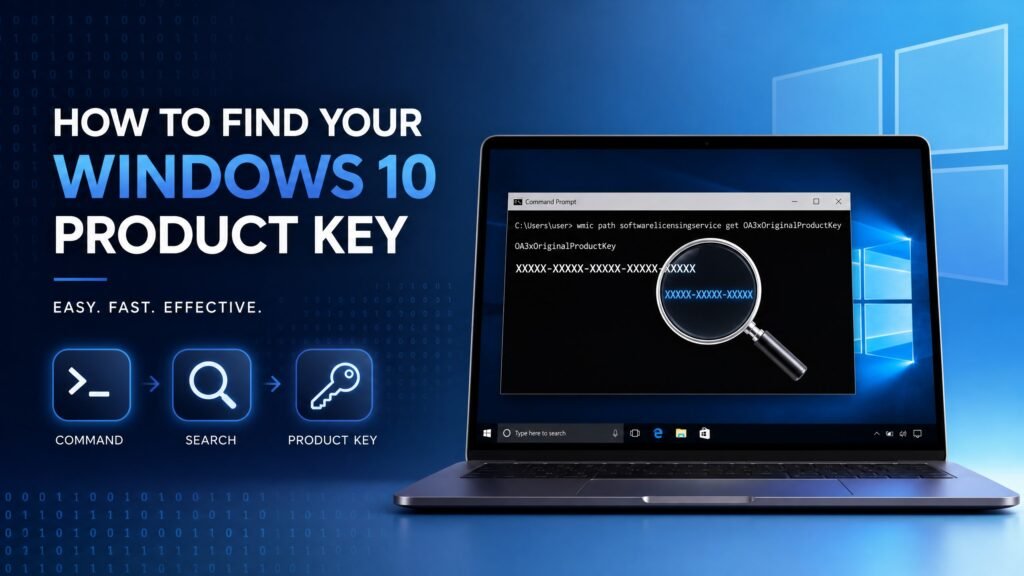
To how to find windows 10 product key questions there is one fast answer: open Command Prompt as Administrator and run wmic path softwarelicensingservice get OA3xOriginalProductKey. If your PC came with Windows preinstalled, the 25-character key stored in your motherboard firmware appears instantly.
But that command only works for one type of licence, and it comes back blank for millions of people. This guide covers all six legitimate methods — CMD, PowerShell, the registry, your Microsoft account, the original sticker or email, and the OEM firmware — plus the honest part most articles skip: what to do when no key exists at all, and how to tell a real key from a useless generic one.
Table of Contents
- Before you start: which licence do you have?
- Method 1 — Command Prompt (CMD)
- Method 2 — PowerShell
- Method 3 — The Windows registry
- Method 4 — Your Microsoft account
- Method 5 — Sticker, card or purchase email
- Method 6 — Third-party key finders (with a warning)
- The command returned nothing — now what?
- Generic keys: the trap nobody warns you about
- Which method should you try first?
- How to check if Windows is activated
- FAQ
Before you start on how to find Windows 10 product key
This step saves enormous frustration, because how to find windows 10 product key depends entirely on the licence type behind your installation.
Press Windows key + I, go to Update & Security → Activation, and read the line at the top. You will see one of three things:
- “Windows is activated with a digital licence” — your activation is tied to your PC’s hardware ID on Microsoft’s servers. There may be no readable 25-character key at all. This is normal, not a problem.
- “Windows is activated with a digital licence linked to your Microsoft account” — same as above, but also recoverable through your account on new hardware.
- “Windows is activated using a product key” — a 25-character key was entered, and the methods below have a real chance of retrieving it.
Digital licences are extremely common on machines upgraded from Windows 7 or 8.1, and on Microsoft Store purchases. If that is your situation, skip ahead to the section on what to do when no key exists.
Method 1 — How to find Windows 10 product key with Command Prompt
This is the fastest answer to how to find windows 10 product key, and the one that works for factory-preinstalled PCs.
- Press Windows key + S, type
cmd. - Right-click Command Prompt and choose Run as administrator.
- Type this command exactly, then press Enter:
wmic path softwarelicensingservice get OA3xOriginalProductKeyIf your PC has an OEM key burned into its BIOS/UEFI firmware, a 25-character code in the format XXXXX-XXXXX-XXXXX-XXXXX-XXXXX appears below the heading. Write it down somewhere safe.
Important limitation: this command reads only the key embedded in firmware by the manufacturer. A retail key you typed in yourself will not show up here. A blank result is common and does not mean your Windows is unlicensed.
One 2026 note: Microsoft deprecated WMIC and has been removing it from clean Windows 11 installs. On Windows 10 it normally still works. If you get “wmic is not recognized,” it has been removed — use Method 2 instead, or re-enable WMIC under Settings → Apps → Optional features.
Method 2 — How to find Windows 10 product key using PowerShell
PowerShell answers how to find windows 10 product key by reaching the same firmware value through a different route, so try it whenever CMD fails or WMIC is missing.
- Press Windows key + X and choose Windows PowerShell (Admin) or Terminal (Admin).
- Paste this and press Enter:
(Get-WmiObject -query 'select * from SoftwareLicensingService').OA3xOriginalProductKeyThe key prints on its own line. If both commands work, you have two confirmations of how to find windows 10 product key on this machine. Some people find one method returns a key while the other returns nothing on the very same machine, which is why it is worth running both before concluding your key is gone.
Method 3 — How to find Windows 10 product key in the registry
Windows sometimes stores a backup copy of the key in the registry, which makes this the third real answer to how to find windows 10 product key. This is the method most guides omit, and it occasionally succeeds where both commands fail.
- Press Windows key + R, type
regedit, press Enter, and approve the prompt. - Navigate to this location:
HKEY_LOCAL_MACHINE\SOFTWARE\Microsoft\Windows NT\CurrentVersion\SoftwareProtectionPlatform- In the right-hand pane, look for BackupProductKeyDefault and double-click it.
- The 25-character key appears under Value data. Copy it, then close Registry Editor without changing anything else.
A word of caution: the registry controls how Windows runs. Read, copy, and leave. Do not delete or edit values while you are in there.
Method 4 — How to find Windows 10 product key via your Microsoft account
If you bought Windows 10 digitally from Microsoft, or your licence is linked to your account, this is the cleanest route for how to find windows 10 product key.
To answer how to find windows 10 product key from the cloud side, sign in at account.microsoft.com in a browser, then check Order history for your Windows purchase — the key is usually stored with the order. Also look under Devices, where linked digital licences appear.
This is also the method that rescues you after a motherboard replacement: a licence linked to your Microsoft account can be reactivated on the repaired or new hardware through Settings → Activation → Troubleshoot.
Method 5 — How to find Windows 10 product key on a sticker or email
Low-tech, but still the most reliable answer to how to find windows 10 product key when a retail licence is involved.
- Certificate of Authenticity (COA) sticker — on the bottom of older laptops, inside the battery compartment, or on the side or back of a desktop tower. Common on Windows 7/8-era machines that were later upgraded.
- Retail box or card — the key card inside the packaging, if you bought a boxed or digital-download copy.
- Purchase email — search your inbox for “product key”, “Windows 10”, or the seller’s name. Keys bought from Microsoft or a reseller always arrive in writing.
If you bought your key from us, it is in the delivery email from Kymakers — search your inbox and spam folder for it before doing anything else.
Method 6 — Third-party tools for how to find Windows 10 product key
Free utilities such as ProduKey and similar tools promise to solve how to find windows 10 product key by reading the registry for you. They can work, but treat them carefully:
- Download only from the developer’s official site — never from an aggregator or download portal, which is a common malware delivery route.
- Expect antivirus warnings. Key-reading tools trip heuristics because reading licence data is exactly what malware does too.
- Understand the limit: these tools read the same registry values you can read yourself in Method 3. They cannot invent a key that does not exist, and they cannot recover a digital licence.
Our honest position: if Methods 1–5 failed, a third-party tool will almost certainly fail too. It is not worth the security risk.
The command returned nothing — now what?
This is where the real answer to how to find windows 10 product key lives, because a blank result is the most common outcome in 2026.
A blank answer to how to find windows 10 product key means one of these:
- You have a digital licence with no readable key. Very common after a free Windows 7/8.1 upgrade, or on Microsoft Store purchases. There is genuinely nothing to find — the activation lives on Microsoft’s servers, tied to your hardware.
- A volume or MAK key activated the machine. Corporate deployments do not leave a retrievable consumer key behind.
- Windows is not actually activated. Check Settings → Activation; if it shows an error, no valid key was ever installed.
Here is the good news for the first case. If your PC is activated with a digital licence, you do not need the key. Reinstall Windows 10 on the same hardware, skip the key prompt during setup, and it reactivates automatically. Before any reinstall, sign in with a Microsoft account and confirm Activation says “linked to your Microsoft account” — that is your insurance policy.
Here is the honest news for the last case. If Windows is not activated and no key exists anywhere, no command will produce one. You will need a genuine licence. That is not an upsell, it is just how licensing works — and it is far cheaper than most people expect.
Generic keys: the trap nobody warns you about
This section exists because it wastes more time than any other part of how to find windows 10 product key.
Search results are full of “free Windows 10 keys” and lists of codes such as VK7JG-NPHTM-C97JM-9MPGT-3V66T. These are generic installation keys published by Microsoft. They let you install a specific edition of Windows without activating it. They are not licences and they will never activate your PC.
Two related traps to avoid:
- KMS activators and “activation tools.” These crack activation rather than licensing it. They are a leading malware vector, they break with updates, and on a work machine they create a real compliance problem.
- Keys under a dollar from anonymous marketplaces. These are usually split volume keys that can be revoked months later, leaving you unactivated with no recourse.
A genuine key from a legitimate reseller costs a fraction of Microsoft’s retail price precisely because resellers buy surplus and regional stock in bulk — but it is never free, and it should always be named by licence type.
After how to find Windows 10 product key: check activation status
Whatever the outcome of your search for how to find windows 10 product key, verify activation status this way:
Go to Settings → Update & Security → Activation for the plain-language answer. For the technical detail, open Command Prompt as Administrator and run:
slmgr /xprA popup tells you whether the machine is permanently activated — the real goal behind how to find windows 10 product key in the first place. For the full picture — licence channel, partial key, expiry — use:
slmgr /dlvThe last five characters of the installed key appear here, which is often enough to confirm which of your keys is in use, even when the full key cannot be recovered.
Which method should you try first?
Rather than working through all six blindly, match the method to your situation. This table is the shortest path to how to find windows 10 product key for your specific case.
| Your situation | Try first | Likely result |
|---|---|---|
| Laptop/desktop bought with Windows preinstalled | Method 1 (CMD) | Firmware OEM key appears |
| Built the PC, bought a boxed or emailed key | Method 5 (email/sticker) | Original key found |
| Upgraded free from Windows 7 or 8.1 | Method 4 + Activation check | Digital licence, no key |
| Bought from Microsoft Store online | Method 4 (account) | Key in order history |
| Company or school machine | Ask IT | Volume key, not retrievable |
| Commands return blank, not activated | Buy a genuine licence | No key exists to recover |
Two habits worth adopting the moment you succeed. First, store the key somewhere that survives a dead hard drive — a password manager, a note in your email, or a photo of the sticker. Second, sign in with a Microsoft account and confirm Activation says the licence is linked to it, so a future reinstall or hardware change is a two-click fix rather than a purchase.
Why Microsoft made this harder over time
It helps to know this is not you doing something wrong. Windows 7 shipped with a sticker on every machine; Windows 10 moved to firmware-embedded OEM keys and then to digital entitlements tied to a hardware hash. Each step reduced piracy and reduced support calls about lost stickers — but it also means the honest answer to how to find windows 10 product key is sometimes “there isn’t one, and you don’t need one.”
That trade-off is genuinely in your favour on the same hardware. It only becomes a problem when the motherboard changes or the licence was never linked to an account, which is exactly why the two habits above matter.
Need a genuine Windows 10 key? Get one at Kymakers
If your search came up empty and Windows is not activated, we sell genuine one-time-purchase licences: legally sourced, tested before delivery, activated on Microsoft’s own servers, delivered by email in minutes, with a money-back guarantee.
- Browse all Windows 10 editions: https://kymakers.shop/product-category/windows/windows-10/
- Windows 10 Pro product key: https://kymakers.shop/product/microsoft-windows-10-pro-product-key/
- Windows 10 Home product key: https://kymakers.shop/product/microsoft-windows-10-home-product-key/
- Windows 10 IoT Enterprise LTSC 2021 (security updates to January 2032 — best for older hardware): https://kymakers.shop/product/windows-10-iot-enterprise-ltsc-2021-product-key/
One honest note on timing: Windows 10 reached end of mainstream support on October 14, 2025. If your hardware can run Windows 11, that is the better destination. If it cannot, LTSC 2021 is the only Windows 10 edition still receiving security updates, through January 13, 2032. Read the full picture in our Windows 10 end of support guide, and if your key refuses to activate, our guide on what to do when a Windows key is not working walks through every error code.
How to find Windows 10 product key — FAQ
Where is the key stored when you ask how to find windows 10 product key? In one of three places: your motherboard’s BIOS/UEFI firmware (OEM machines), the Windows registry under SoftwareProtectionPlatform, or nowhere at all if you have a digital licence tied to your hardware ID.
Why does the wmic method of how to find windows 10 product key return blank? Because it reads only firmware-embedded OEM keys. A retail key you typed in, a volume key, or a digital licence will all return blank. Try PowerShell and the registry method next.
Can I find my Windows 10 product key after a reinstall? If the key was in firmware, yes — the commands still read it. If it was a digital licence, there is no key to find, but Windows reactivates automatically on the same hardware.
Is my Product ID the same as my product key? No. The Product ID in Settings → About is an installation identifier, not a licence. It cannot activate anything.
Do free Windows 10 keys from the internet work? No. Published codes are generic installation keys that let you install without activating. Only a purchased licence activates Windows.
What is the easiest way of how to find windows 10 product key without software? Methods 1 through 3 use only tools already built into Windows: Command Prompt, PowerShell and Registry Editor. No download required.
What if I replaced my motherboard and lost activation? Sign in with the Microsoft account your licence was linked to, then use Settings → Activation → Troubleshoot → “I changed hardware on this device recently.” If the licence was never linked to an account, you will need a new one.
After how to find windows 10 product key, can I transfer it to another PC? Retail keys: yes, once removed from the old machine. OEM keys: no, they are permanently tied to their original hardware. This is why licence type matters when buying.
Written by the KYMakers Technical Team. Technically reviewed by a Microsoft licensing specialist. Last updated: August 2, 2026. Sources: Microsoft Learn, Microsoft Support. KYMakers sells genuine, one-time-purchase Microsoft license keys with instant email delivery.