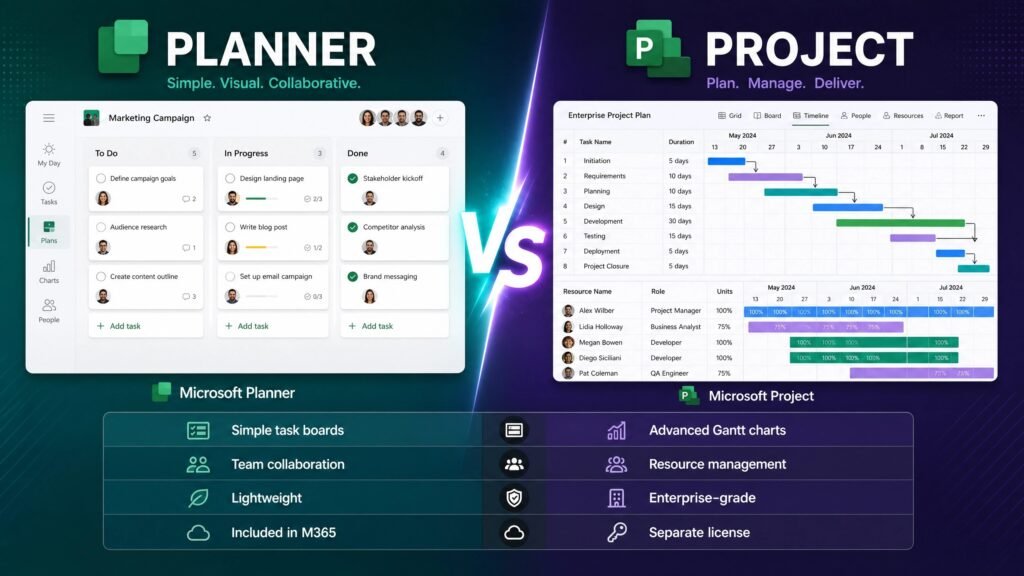
Microsoft Planner vs Project comes down to complexity: Planner is a shared task board for teams — free with most Microsoft 365 subscriptions — while Microsoft Project is professional scheduling software with Gantt charts, task dependencies, critical path and resource management. If your work fits on a Kanban board, Planner is enough. If you need to know which task slipping by two days delays the whole delivery, you need Project.
There is a second layer most comparisons miss, and it matters in 2026: Microsoft renamed the entire product line. What used to be called Project Plan 1, 3 and 5 are now Planner Plan 1, Planner and Project Plan 3, and Planner and Project Plan 5. That rebrand is why searching for this topic returns so much contradictory information. This guide untangles it with verified current names, prices and dates.
Table of Contents
- Microsoft Planner vs Project: quick comparison
- What Microsoft Planner actually is
- What Microsoft Project actually is
- The 2024 rebrand that confused everyone
- Current plans and pricing
- Feature comparison table
- Which should you choose?
- Planner vs Project for small businesses
- Common mistakes people make
- Subscription vs perpetual licence: the real cost
- Important 2026 dates you should know
- FAQ
Microsoft Planner vs Project: quick comparison table
| Microsoft Planner | Microsoft Project | |
|---|---|---|
| Best for | Team task tracking | Formal project scheduling |
| Learning curve | Minutes | Days to weeks |
| Kanban boards | ✅ Yes | ✅ Yes |
| Gantt charts | Premium tiers only | ✅ Full |
| Task dependencies | Premium tiers only | ✅ Full |
| Critical path | ❌ No | ✅ Yes |
| Resource management | Limited | ✅ Full |
| Baselines & variance | ❌ No | ✅ Yes |
| Portfolio management | Plan 5 only | ✅ Yes |
| Desktop app | ❌ Web/Teams only | ✅ Yes |
| Cost | Included with most M365 | From $10/user/month, or one-time purchase |
The honest summary of Microsoft Planner vs Project: they are not really competitors. Planner is where a team agrees who does what this week. Project is where a project manager models how a hundred interdependent tasks fit into a schedule and a budget.
Microsoft Planner vs Project: what Planner actually is
Planner is Microsoft’s lightweight work management app, living inside Microsoft Teams and on the web. In 2024 Microsoft merged three products into it — the old Planner, Microsoft To Do, and Project for the web — creating one app for personal tasks, team boards and basic project plans.
What you get in the version included with Microsoft 365:
- Kanban boards with buckets, labels and drag-and-drop cards
- Tasks with checklists, file attachments, comments and due dates
- My Day, My Tasks and Assigned to me views that pull your work together across every plan
- Deep Teams integration, so plans live in the channel where the work is discussed
- Real-time collaboration and mobile apps
What you do not get at the free tier: Gantt charts, task dependencies, resource levelling, baselines, or any real reporting. It is a very good shared to-do system. Calling it project management is generous.
The important commercial fact in the Microsoft Planner vs Project debate: if your organisation already pays for Microsoft 365 Business or Enterprise, you already have Planner. Many teams buy project software without realising a capable task board is sitting unused in their Teams sidebar.
Microsoft Planner vs Project: what Project actually is
Microsoft Project has been the industry standard for scheduling since 1984, and it does things Planner structurally cannot.
The features that define it:
- Gantt charts — the visual timeline that shows every task, its duration and its overlap
- Task dependencies — finish-to-start, start-to-start and lag relationships, so moving one task automatically reflows the rest
- Critical path — the chain of tasks that determines your end date, which is the single most valuable output in professional scheduling
- Resource management — assign people and equipment, spot overallocation, level workloads
- Baselines — freeze the original plan and measure actual progress against it
- Cost tracking — rates, budgets and earned-value analysis
- Portfolio management — compare and prioritise multiple projects (top tiers)
Project comes in two very different forms, and conflating them causes most of the confusion around Microsoft Planner vs Project. There is the desktop application (Project Standard 2024 and Project Professional 2024), bought once and installed on a PC. And there are the cloud subscription plans, billed monthly per user.
The 2024 rebrand that confused everyone
This section exists because outdated microsoft planner vs project articles are actively misleading people.
Microsoft folded its cloud project products under the Planner brand:
- April 2024: Project Plan 1 was renamed Planner Plan 1.
- 18 September 2024: Project Plan 3 and Project Plan 5 became Planner and Project Plan 3 and Planner and Project Plan 5.
- 1 August 2025: Project for the web retired; its capabilities live on inside Planner.
- 30 September 2026: Project Online retires completely.
Microsoft has confirmed that features and pricing did not change with the renaming — only the labels. But it means any guide written before late 2024 describes a lineup that no longer exists by name.
Crucially, Project desktop and Project Server were not renamed. Project Standard 2024 and Project Professional 2024 still exist under those names, still as one-time purchases. So when you research Microsoft Planner vs Project today, you are comparing a rebranded cloud family against an unchanged desktop product.
Microsoft Planner vs Project: current plans and pricing
Verified current pricing for both sides of microsoft planner vs project, so you can do the maths properly.
| Plan | Price | What it adds |
|---|---|---|
| Planner (in Microsoft 365) | Included | Task boards, My Day, Teams integration |
| Planner Plan 1 | ~$10/user/month | Premium web planning, timelines, goals |
| Planner and Project Plan 3 | ~$30/user/month | Project desktop client, Gantt, resource management |
| Planner and Project Plan 5 | ~$55/user/month | Portfolio management, enterprise resource management |
| Project Standard 2024 | $679.99 one-time | Desktop scheduling, no collaboration features |
| Project Professional 2024 | $1,129.99 one-time | Desktop + resource management + team features |
Two notes that change decisions. First, Plan 3 is the tier where the desktop app appears — the thing most people actually picture when they say “Microsoft Project.” Plan 1 is web-only. Second, Microsoft’s own pricing page states that Planner and Project Plan 5 moves to End of Sale on 1 May 2026, meaning new purchases of that tier are no longer available.
Those retail figures for the desktop versions are Microsoft’s list prices. Genuine perpetual keys from legitimate resellers cost a small fraction of them, which is exactly what makes the cost comparison below so lopsided.
Feature comparison: where the line falls
The clearest way to settle microsoft planner vs project is to ask which of these you actually need.
Planner handles fine: assigning tasks, tracking status, deadlines per task, team collaboration, simple checklists, recurring work, and giving everyone one view of their own workload.
Only Project handles: “if this task slips three days, what is our new end date?”, “who is overallocated next month?”, “how does actual progress compare to the original baseline?”, “what is the critical path?”, and “which of our twelve projects should we resource first?”
That first question is the practical test. If you have ever needed to answer it, Planner will frustrate you within a week. If you have never needed to answer it, Project will feel like an aeroplane cockpit for a bicycle trip.
Microsoft Planner vs Project: which should you choose?
Here is the microsoft planner vs project answer case by case, honestly — including the cases where we recommend not buying anything.
Choose Planner (and spend nothing) if: you run a small team, your work is task lists rather than dependency chains, you already pay for Microsoft 365, and you live in Teams. This describes most teams asking the question, and we would rather say so than sell you a licence you will not use.
Choose Planner Plan 1 if: you want slightly richer web-based planning with timelines and goals, but no desktop scheduling and no resource management.
Choose Project desktop (perpetual) if: you are a project manager, consultant, engineer or contractor who needs real Gantt charts, dependencies, critical path and baselines on your own machine — and you intend to use it for years. This is where a one-time purchase dramatically beats a subscription.
Choose Planner and Project Plan 3 if: you need the desktop client plus cloud collaboration across a team, and you prefer operating expenditure to a capital purchase.
Choose Plan 5 if: you manage a portfolio at enterprise scale — though note the May 2026 End of Sale on that tier.
Consider neither if: your real problem is that nobody knows who is doing what. That is a communication problem, and no scheduling tool fixes it.
Microsoft Planner vs Project for small businesses
Small teams ask the microsoft planner vs project question most often, and the answer is usually the cheaper one.
If you are a five-person agency, a construction firm with a handful of concurrent jobs, or a consultancy running client work, start with the Planner you already own. Build a board per client or per job, use buckets for stages, and see whether anything genuinely breaks. Most small businesses discover the constraint was never the software.
The moment to add Project is specific and recognisable: you start missing deadlines because you cannot see which tasks block which. That is the dependency problem, and it is the one thing Planner cannot model. Buy one perpetual Project licence for whoever owns the schedule rather than subscriptions for the whole team.
Microsoft Planner vs Project for freelancers
For a solo freelancer, Planner is almost always sufficient, and a perpetual Project licence makes sense only if clients require formal Gantt deliverables. That does happen — construction, engineering and government contracts often specify a Microsoft Project file as a deliverable — and in that case the one-time purchase is a business expense you make once and use for years.
What we would not recommend to a freelancer is a Plan 3 subscription. Paying roughly $360 a year forever for software you open a few times a month is the worst of both worlds.
Common mistakes people make choosing between them
Four patterns come up repeatedly when people revisit the Microsoft Planner vs Project decision after getting it wrong.
Buying Project for task tracking. The software is not too complex by accident — it is built to model schedules mathematically. Teams that only needed a shared list abandon it within months.
Assuming Plan 1 includes the desktop app. It does not. The desktop client arrives at Plan 3. This single misunderstanding causes a lot of frustrated refund requests.
Buying Project 2021 in 2026 because it is cheaper. Ten weeks of support left. Only defensible at a deep discount for a short, offline project.
Ignoring Planner because it is free. Free software carries an assumption of being worthless. Planner genuinely covers what a large share of teams need, and testing it first costs nothing but an afternoon.
Subscription vs perpetual licence: the real cost
This is where Microsoft Planner vs Project becomes a budgeting question rather than a feature question.
Planner and Project Plan 3 costs about $30 per user per month — roughly $360 per user per year. Over five years, one project manager costs about $1,800, and the meter never stops. Stop paying and you lose access to the desktop app entirely.
A perpetual Project Professional 2024 licence is a single purchase. At Microsoft’s list price of $1,129.99 it already beats five years of Plan 3. At genuine reseller pricing it is not a close contest at all — it is the difference between a rounding error and a recurring line item.
Where the subscription still genuinely wins: you need cloud co-authoring across a team, you want portfolio features, your team size fluctuates, or your finance department prefers monthly costs. Where perpetual wins: one or a few dedicated schedulers, stable headcount, offline work, and a multi-year horizon.
Microsoft Planner vs Project: important 2026 dates
Three deadlines affect the microsoft planner vs project decision right now.
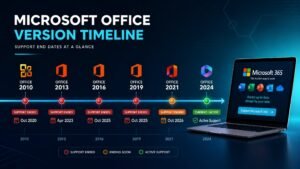
13 October 2026 — Project 2021 end of support. Microsoft has confirmed that Project LTSC 2021 reaches end of support on the same day as Office LTSC 2021 and Visio LTSC 2021. No security updates, no fixes, and no Extended Security Updates programme exists. That is roughly ten weeks away.
1 May 2026 — Planner and Project Plan 5 End of Sale. Per Microsoft’s pricing page, new purchases of that tier are no longer available.
30 September 2026 — Project Online retirement. The legacy cloud platform shuts down entirely; its capabilities continue in Planner.
The practical consequence: if you are buying a perpetual Project licence in 2026, buy Project 2024, not Project 2021. Project 2024 follows the same lifecycle as Office LTSC 2024, supported until October 2029. Project 2021 has ten weeks left. We would rather tell you that than sell you the cheaper key.
Get a genuine Microsoft Project licence at Kymakers
Genuine one-time-purchase Project keys: legally sourced, tested before delivery, activated on Microsoft’s own servers, delivered by email within minutes, with a money-back guarantee — no monthly fees, ever.
- Microsoft Project 2024 Professional — the recommended pick, supported to 2029: https://kymakers.shop/product/microsoft-project-2024-professional-product-key/
- Microsoft Project 2021 Professional — note support ends 13 October 2026: https://kymakers.shop/product/microsoft-project-2021-professional-product-key/
- Office 2024 Pro Plus + Visio 2024 + Project 2024 bundle — best value if you need all three: https://kymakers.shop/product/office-2024-pro-plus-visio-project-2024-bundle/
- Browse all Visio and Project licences: https://kymakers.shop/product-category/visio-project/
Useful next reads: our full breakdown of MS Office versions and their support dates, the comparison of one-time purchase vs Microsoft 365, and the step-by-step guide to activating your Microsoft product key. Microsoft’s own comparison of work management offerings is worth reading alongside this guide for the cloud tiers.
Microsoft Planner vs Project FAQ
In microsoft planner vs project, is Planner free? The core Planner app is included with most Microsoft 365 Business and Enterprise subscriptions at no extra cost. Premium capabilities require Planner Plan 1 or higher.
What is the main difference in Microsoft Planner vs Project? Planner manages tasks; Project manages schedules. Gantt charts, task dependencies, critical path, baselines and resource management are Project features that Planner does not replicate.
Did Microsoft Project get renamed to Planner? The cloud plans were renamed — Project Plan 1 became Planner Plan 1 in April 2024, and Plans 3 and 5 became Planner and Project Plan 3 and 5 in September 2024. Project desktop and Project Server kept their names.
Can Planner do Gantt charts? Not in the version included with Microsoft 365. Timeline and premium planning views require paid Planner tiers, and full Gantt scheduling requires Project.
In microsoft planner vs project, do I need Project if I already have Microsoft 365? Only if you need dependencies, critical path, baselines or resource levelling. For task tracking, the Planner already in your subscription is enough — check it before buying anything.
Is a one-time Project licence cheaper than a subscription? For a single long-term user, yes, and by a wide margin. Plan 3 costs roughly $360 per user per year indefinitely, while a perpetual Project 2024 licence is paid once.
After settling microsoft planner vs project, which Project version should I buy in 2026? Project 2024, supported until October 2029. Project 2021 reaches end of support on 13 October 2026 and should only be considered at a steep discount for short-term or offline use.
In microsoft planner vs project, can the two work together? Yes. Many organisations run Planner for everyday team tasks and give only their project managers a Project licence. That hybrid is usually the cheapest correct answer to Microsoft Planner vs Project.
Written by the KYMakers Editorial Team. Technically reviewed by a Microsoft licensing specialist. Last updated: 2 August 2026. Sources: Microsoft Support, Microsoft Planner pricing page, Microsoft Lifecycle, Microsoft 365 Message Center. KYMakers sells genuine, one-time-purchase Microsoft license keys with instant email delivery.