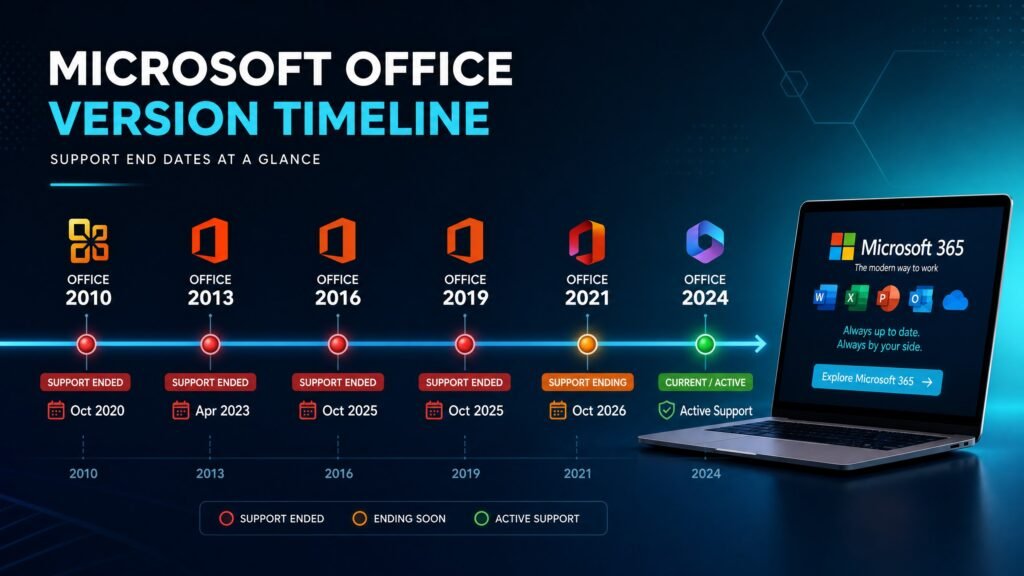
All ms office versions fall into two families: perpetual releases you buy once (Office 2010, 2013, 2016, 2019, 2021 and 2024) and Microsoft 365, the subscription that updates continuously. In August 2026 only two perpetual releases are still supported — Office 2021 until 13 October 2026, and Office 2024 until 9 October 2029.
That first date is roughly ten weeks away, which makes this the most consequential moment in years to know exactly which version you own. This guide lists every release, its real support deadline, what each edition includes, and an honest recommendation for what to buy today.
Table of Contents
- MS Office versions at a glance (support table)
- Full version history and what changed
- Editions explained: Home, Business, Professional Plus, LTSC
- Perpetual versions vs Microsoft 365
- Which version should you buy in 2026?
- The Office 2021 deadline: what to do now
- MS Office versions for Mac
- MS Office versions and Windows compatibility
- How to check which version you have
- FAQ
MS Office versions at a glance
Here are the ms office versions that still matter, with the dates Microsoft has published. Bookmark this table — it is the whole decision in one screen.
| Version | Released | Support ends | Status in 2026 |
|---|---|---|---|
| Office 2024 / LTSC 2024 | Oct 2024 | 9 October 2029 | ✅ Supported — buy this |
| Office 2021 / LTSC 2021 | Oct 2021 | 13 October 2026 | ⚠️ ~10 weeks left |
| Office 2019 | Sep 2018 | 14 October 2025 | ❌ Out of support |
| Office 2016 | Sep 2015 | 14 October 2025 | ❌ Out of support |
| Office 2013 | Jan 2013 | 11 April 2023 | ❌ Long dead |
| Office 2010 | Jun 2010 | 13 October 2020 | ❌ Long dead |
| Microsoft 365 | Subscription | Continuous | ✅ Always current |
Notice how compressed the safe zone has become. Of six perpetual releases spanning fourteen years, exactly one has a comfortable runway left. Two things stand out. First, Office 2016 and Office 2019 both died on the same day — 14 October 2025 — so a large share of machines still running them are already unpatched. Second, Microsoft has quietly shortened the lifecycle: Office 2019, 2021 and 2024 each received only five years of support, not the ten years older releases enjoyed.
There is also no Extended Security Updates programme for Office. Unlike Windows 10, when an Office version reaches its date, that is genuinely the end — no paid extension exists.
Full MS Office versions history and what changed
Knowing what each of the ms office versions actually added helps you judge whether upgrading is worth it.
Office 2010
Introduced the Backstage view and the ribbon across all apps. Support ended October 2020. Still occasionally found on isolated machines running legacy macros.
Office 2013
Brought the flat modern interface, cloud saving to OneDrive, and touch support. Support ended April 2023.
Office 2016
Added real-time co-authoring, Tell Me search, and modern chart types in Excel. Reached end of support 14 October 2025.
Office 2019
Added focus mode in Word, funnel charts and 2D maps in Excel, morph and zoom transitions in PowerPoint. Also reached end of support 14 October 2025 — the same day as Office 2016, which surprised many buyers.
Office 2021
Added XLOOKUP and dynamic arrays in Excel — arguably the most useful spreadsheet upgrade in a decade — plus dark mode, LET and LAMBDA functions, and improved co-authoring. Support ends 13 October 2026.
Office 2024
The current perpetual release. Better performance and stability, further Excel function improvements, expanded accessibility tools, and a longer runway to 2029. Feature-wise it is an evolution of 2021 rather than a revolution, which is worth knowing before you assume a big visual change.
Across all these ms office versions, the practical truth is that Word, Excel and PowerPoint have been mature for years. The gap between 2021 and 2024 is small for everyday work; the gap that matters is the support date.
Editions explained: Home, Business, Professional Plus, LTSC
Version is the year; edition is what you get inside it. Every one of the ms office versions above shipped in several editions.
Home & Student. Word, Excel, PowerPoint and OneNote. No Outlook, and no commercial-use rights. Right for students and household use.
Home & Business. Adds Outlook and permits commercial use. The default choice for freelancers and small businesses.
Professional / Professional Plus. The full suite — Word, Excel, PowerPoint, Outlook, Access, Publisher and OneNote. Professional Plus is the volume-licensing variant and the most common edition sold by resellers, offering the best value per application.
Standard. A business edition without Access. Common in corporate deployments.
LTSC (Long-Term Servicing Channel). The frozen enterprise build. Same apps, no new features ever, only security patches. Built for air-gapped machines, regulated environments and industrial systems where change itself is the risk.
One nuance about LTSC that matters if you are shopping: LTSC and the retail perpetual release of the same year share the same end date. LTSC 2021 and Office 2021 both stop on 13 October 2026. LTSC is not a longer-support option for Office the way it is for Windows.
Perpetual MS Office versions vs Microsoft 365
This is the real fork in the road between the ms office versions, so here are both sides honestly.
Perpetual (one-time purchase). You pay once and own that version forever. It never expires, never phones home for renewal, and works offline. You do not get new features, and you do not get a free upgrade to the next release. When support ends, you either keep using it unpatched or buy the next version.
Microsoft 365 (subscription). Roughly $100 per year for Personal. Always the newest features, 1 TB of OneDrive storage, multi-device installs, and no support-deadline anxiety. Stop paying and the apps stop working.
The five-year maths: Microsoft 365 Personal over five years costs about $500. A perpetual Office 2024 licence covers the same five years — almost exactly matching its support window to 2029 — for a fraction of that, with no renewals.
Where the subscription genuinely wins: you want the cloud storage bundled, you need Office on many devices, or you want Copilot and continuous features. Where perpetual wins: a single main PC, a fixed budget, offline work, or a business that dislikes recurring costs. Our dedicated comparison of one-time purchase vs Microsoft 365 goes deeper into the numbers.
Which MS Office version should you buy in 2026?
Of all the ms office versions available today, the short answer is Office 2024 Professional Plus. It is the only perpetual release with a meaningful support runway, it includes every application, and it costs a fraction of retail from a legitimate reseller.
The honest case-by-case breakdown:
- Buying today for long-term use → Office 2024. Supported to October 2029, and the same apps you already know.
- Tight budget, and you accept the risk → Office 2021 can be defensible only at a steep discount, and only if you understand that patches stop in October 2026. Not our recommendation as a primary suite.
- Air-gapped or regulated machine → Office LTSC 2024. Same 2029 date, no feature churn.
- Multiple devices plus cloud storage → Microsoft 365 is the better fit; we will tell you that plainly rather than sell you the wrong thing.
- Already on Office 2019 or 2016 → you are unpatched right now. Upgrading is the security decision, not a luxury.
One compatibility check before you buy: Office 2024 requires Windows 10 or Windows 11. It will not install on Windows 8.1 or Windows 7. And since Windows 10 itself reached end of support in October 2025, the fully supported combination in 2026 is Office 2024 on Windows 11.
The Office 2021 deadline: what to do in the next ten weeks
This section is the most time-sensitive part of any guide to ms office versions right now.
Microsoft has confirmed that support for Office 2021 and Office LTSC 2021 ends 13 October 2026. After that date there are no further security updates, bug fixes or technical support. Visio LTSC 2021 and Project LTSC 2021 end on the same day. There is no ESU programme and no extension.
Your realistic options:
- Upgrade to Office 2024. A one-time purchase that moves your deadline to October 2029. The simplest fix for most people and businesses.
- Move to Microsoft 365. Ends deadline anxiety permanently, at the cost of a recurring fee.
- Keep using Office 2021 unpatched. The apps will keep opening. Every vulnerability found after October stays open forever. Acceptable for an offline machine; risky for anything handling email or client documents.
- Do a proper inventory first, if you run a business. Check your add-ins, macros, templates, and any Visio or Project installations before you migrate. Compatibility, not purchasing, is what actually delays these projects.
If you own Office 2021 today, put a calendar reminder for late September. Ten weeks disappears quickly, and prices on the outgoing version rarely improve as a deadline approaches — demand for replacements does the opposite.
MS Office versions for Mac
Mac follows a parallel but smaller lineup of ms office versions, and licences are not interchangeable — a Windows key will never activate Office on macOS.
The perpetual Mac releases are Office Home & Student and Office Home & Business, in the same year generations. Office 2024 for Mac and Office LTSC for Mac 2024 both go out of support on 9 October 2029, matching the Windows timeline. There is no Professional Plus edition for Mac.
Document compatibility is complete in both directions, so a mixed household or office loses nothing by running Office for Mac on some machines and Office for Windows on others. Our guide to Microsoft Office for MacBook covers edition choices and the Apple Silicon details.
MS Office versions and Windows compatibility
Choosing between ms office versions is only half the decision — the other half is what your PC can run. This pairing catches people out constantly.
| Office version | Minimum Windows |
|---|---|
| Office 2024 / LTSC 2024 | Windows 10 or Windows 11 |
| Office 2021 / LTSC 2021 | Windows 10 or Windows 11 |
| Office 2019 | Windows 10 |
| Office 2016 | Windows 7 SP1 or later |
| Office 2013 | Windows 7 or later |
The practical consequence: if you are still on Windows 7 or 8.1, none of the currently supported ms office versions will install. Office 2016 is the newest suite that will run, and it has been unpatched since October 2025 — so you would be stacking one unsupported product on top of another.
The honest sequence in that situation is to fix the operating system first, then Office. Our guide to upgrading Windows 7 to Windows 10 covers that path, including the activation reality in 2026.
Standalone apps as an alternative
You do not always need a full suite. Microsoft sells Word, Excel, Outlook, Access, Visio and Project as standalone perpetual licences in the same year generations as the ms office versions above.
If you only ever open Excel, a single standalone Excel 2024 licence costs meaningfully less than a full Professional Plus suite. Conversely, if you need three or more applications, the suite is almost always cheaper than buying them individually. Do the arithmetic against what you actually open in a normal week, not what you imagine you might need.
How to check which MS Office version you have
Identifying which of the ms office versions is installed takes sixty seconds, with no downloads.
- Open any Office app — Word is easiest.
- Click File → Account (or Office Account).
- Read the block under Product Information. It names your edition and version, for example “Microsoft Office Professional Plus 2021.”
- Click About Word for the exact build number and whether you are on 32-bit or 64-bit.
On a Mac, open Word and choose Word → About Word from the menu bar.
Two things to note while you are there. If Product Information says Microsoft 365, you are on the subscription, not a perpetual release, and support dates do not apply to you. If it shows an activation warning instead, the installation is not licensed — and the version you have installed may not match the key you own, which is the single most common cause of activation failure across all ms office versions.
Get a genuine Office licence at Kymakers
Genuine one-time-purchase Office keys: legally sourced, tested before delivery, activated on Microsoft’s own servers, delivered by email within minutes, with a money-back guarantee.
- Office 2024 Professional Plus — the recommended pick, supported to October 2029: https://kymakers.shop/product/microsoft-office-2024-professional-plus-product-key/
- Office 2021 Professional Plus — note support ends 13 October 2026: https://kymakers.shop/product/microsoft-office-2021-professional-plus-product-key/
- Office 2024 Standard: https://kymakers.shop/product/microsoft-office-2024-standard-product-key/
- Browse every Office version and edition: https://kymakers.shop/product-category/microsoft-office/
Useful next reads on our site: the detailed Office 2021 vs Office 2024 comparison, the full breakdown of one-time purchase vs Microsoft 365, what a product key actually is in our MS Office CD key guide, and the step-by-step guide to activating your Microsoft product key.
MS Office versions FAQ
How many ms office versions are there? Perpetual releases still relevant today: Office 2010, 2013, 2016, 2019, 2021 and 2024, plus their LTSC variants. Microsoft 365 sits alongside them as a continuously updated subscription rather than a numbered version.
Which of the ms office versions is the newest? Office 2024 (and Office LTSC 2024), released October 2024, supported until 9 October 2029. Microsoft 365 is always newer in features, since it updates monthly.
Among current ms office versions, is Office 2021 still supported? Only until 13 October 2026. After that date there are no security updates, no bug fixes and no ESU programme.
Are Office 2016 and Office 2019 still supported? No. Both reached end of support on 14 October 2025 and are unpatched now.
What is the difference between Office 2024 and Office LTSC 2024? Both are one-time purchases with the same 2029 end date. LTSC 2024 is the frozen enterprise build with no new features, aimed at regulated or offline environments; Office 2024 is the standard perpetual release.
Do older ms office versions still work after support ends? Yes, the apps keep running. What stops is security patching, so newly discovered vulnerabilities in Word, Excel or Outlook stay permanently unfixed.
Can I upgrade from one Office version to another for free? No. Perpetual licences carry no upgrade rights, so moving from Office 2021 to Office 2024 requires a new licence. Microsoft 365 subscribers always receive the newest apps as part of the subscription.
Which Office version works on Windows 7 or 8.1? Office 2024 and Office 2021 both require Windows 10 or 11. Older releases such as Office 2016 install on Windows 7, but they are out of support — the better answer is upgrading the operating system.
Written by the KYMakers Editorial Team. Technically reviewed by a Microsoft licensing specialist. Last updated: 2 August 2026. Sources: Microsoft Lifecycle, Microsoft Support, Microsoft 365 Message Center. KYMakers sells genuine, one-time-purchase Microsoft license keys with instant email delivery.