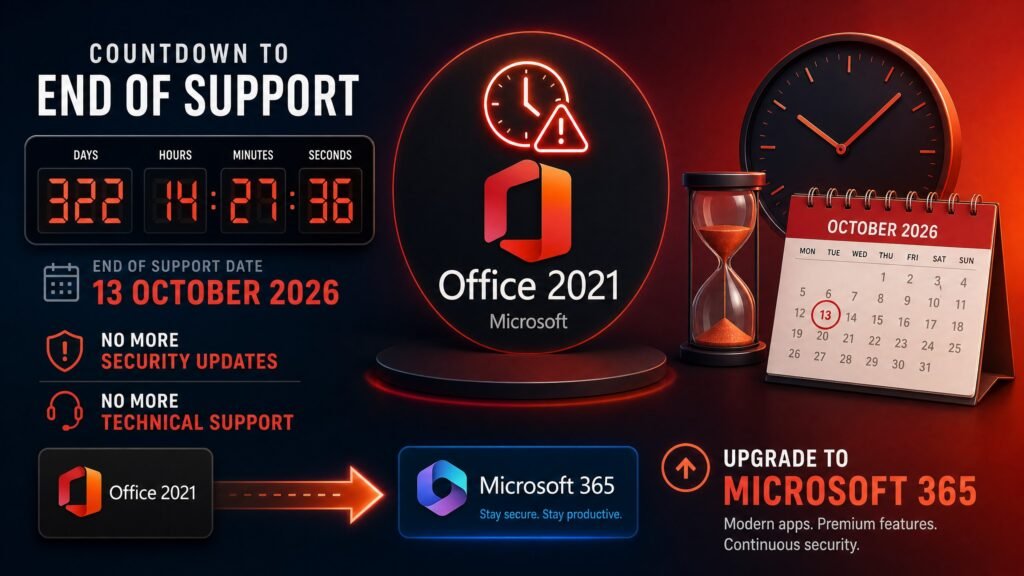
Office 2021 end of support arrives on 13 October 2026. On that date Microsoft stops delivering security updates, bug fixes and technical support for Office 2021 and Office LTSC 2021. Your apps will keep opening — Word, Excel, Outlook and PowerPoint do not switch off — but every vulnerability discovered afterwards stays permanently unpatched.
There is no Extended Security Updates programme for Office. Unlike Windows 10, which got a paid extension, this deadline is final. That leaves roughly ten weeks to decide, and this guide covers every option honestly — including the one where you do nothing and accept the risk.
Table of Contents
- Office 2021 end of support: the exact date
- What actually happens on 13 October 2026
- What still works and what stops
- Why this deadline matters more than expected
- How it compares to Windows 10
- Visio and Project 2021 die the same day
- Your four options, compared
- Option 1 — Upgrade to Office 2024
- Option 2 — Move to Microsoft 365
- Option 3 — Keep using it unpatched
- Option 4 — Do nothing yet, but inventory first
- Business and compliance risks
- Does Office 2021 for Mac end too?
- Migration checklist
- FAQ
Office 2021 end of support: the exact date
Microsoft has confirmed the office 2021 end of support date repeatedly through its lifecycle documentation and Message Center: 13 October 2026.
This applies to the whole 2021 generation — Office Home & Student 2021, Office Home & Business 2021, Office Professional 2021, Office Professional Plus 2021, and Office LTSC 2021. Retail and volume licences share the same deadline.
One correction worth making, because it trips up a lot of IT buyers: LTSC does not extend Office support. With Windows, an LTSC edition buys you years of extra patching. With Office it does not. Office LTSC 2021 and retail Office 2021 both end on 13 October 2026.
Note also how short the lifecycle was. Older Office releases received ten years of support. Office 2019, 2021 and 2024 each received only five years under the Fixed Lifecycle Policy. If you bought Office 2021 expecting a decade, that expectation was reasonable — and wrong.
Office 2021 end of support: what happens on 13 October 2026
Nothing dramatic happens on the day of office 2021 end of support itself, which is precisely why this deadline gets ignored.
After the Office 2021 end of support date, Microsoft stops shipping:
- Security updates — no patches for newly discovered vulnerabilities in Word, Excel, PowerPoint, Outlook, Access or Publisher
- Bug fixes — existing defects stay as they are, forever
- Technical support — Microsoft support will not troubleshoot the product
- Compatibility updates — no adjustments for new Windows versions or file formats
The risk builds gradually rather than arriving at once. In November it is negligible. By mid-2027, attackers will have had months to work on unpatched flaws in software still installed on millions of machines — and Office documents remain one of the most common malware delivery routes in existence, precisely because a macro or a crafted file can exploit the application that opens it.
What still works and what stops after Office 2021 end of support
Let’s be precise about office 2021 end of support, because scare-marketing on this topic is common.
Keeps working normally:
- Opening, editing and saving all your documents
- Every feature you use today — nothing is removed or disabled
- Printing, macros, add-ins and templates
- Your licence — a perpetual key does not expire
- File compatibility with newer Office versions
Stops:
- Security patching (the whole point)
- Bug fixes and technical support
- Any assurance of compatibility with future Windows updates
The honest summary: Office 2021 end of support is a security event, not a functionality event. Nobody loses their files and nobody gets locked out. What you lose is the safety net.
Visio and Project 2021 die the same day
This part of office 2021 end of support catches organisations out badly, so check your estate before October.
Microsoft’s own announcement confirms that support for Visio LTSC 2021 and Microsoft Project LTSC 2021 ends on 13 October 2026 as well — the same day as Office. Several other 2021-generation products go with them.
If you bought a bundle containing Office 2021 plus Visio 2021 plus Project 2021 — a very common purchase — all three components hit the wall simultaneously. Budget for replacing the whole bundle, not just the Office part.
Why the Office 2021 end of support date matters more than people expect
Two things make this deadline unusually consequential, and both are easy to miss.
The lifecycle was halved without much fanfare. Office 2013 received ten years of support. Office 2019, 2021 and 2024 each received five. Anyone who bought Office 2021 in 2021 or 2022 reasonably assumed they had until 2031. That assumption is the single biggest reason organisations are unprepared.
Office is the most attacked application family on the desktop. Malicious documents remain a primary infection route because they exploit the application that opens them, and unpatched Office is exactly the target attackers look for. Office 2021 end of support therefore creates a larger exposure than an unsupported utility or media player would.
There is a third factor that is commercial rather than technical. Millions of licences reach this date simultaneously, which means demand for replacements concentrates into a few weeks. Buying in August is a calm decision; buying in mid-October is a scramble at whatever price and stock happen to be available.
How this compares to Windows 10 end of support
Many people assume Office will follow the Windows 10 pattern, where a paid extension appeared. It does not, and the difference is worth stating clearly.
Windows 10 reached end of support on 14 October 2025 and Microsoft offered a consumer ESU bridge plus a business ESU subscription. Office 2021 end of support has no equivalent. There is no consumer programme, no paid business extension, and no LTSC edition with a longer runway. When the date passes, patching genuinely stops for everyone.
If you are dealing with both deadlines on the same machines — an older PC on Windows 10 with Office 2021 installed — treat them as one project rather than two. Our Windows 10 end of support guide covers that side, and pairing Office 2024 with Windows 11 is the combination that is fully supported in 2026.
Office 2021 end of support: your four options compared
| Option | Cost | Support until | Best for |
|---|---|---|---|
| Upgrade to Office 2024 | One-time purchase | October 2029 | Most users and small businesses |
| Move to Microsoft 365 | ~$100+/year forever | Continuous | Multi-device users, cloud teams |
| Keep Office 2021 unpatched | Free | None | Offline or isolated machines only |
| Inventory, then decide | Time only | — | Businesses with add-ins and macros |
There is no fifth option. No paid extension exists, and no unofficial patching route is safe or legal.
Option 1 — Upgrade to Office 2024 (recommended)
For most people this is the simplest and cheapest answer to office 2021 end of support.
Office 2024 and Office LTSC 2024 are supported until 9 October 2029 under the same Fixed Lifecycle Policy. That is a further three years of security updates from the 2026 deadline. It remains a one-time purchase — no subscription, no renewals.
What you get and do not get:
- You get: three more years of patching, better performance and stability, improved Excel functions, expanded accessibility tools, and the same familiar apps.
- You do not get: a dramatic redesign. Office 2024 is an evolution of 2021, not a reinvention. If you are hoping the upgrade will feel transformative, temper that.
Two honest caveats. First, the same shortened lifecycle applies — five years, so plan your 2029 replacement now rather than being surprised again. Second, Office 2024 requires Windows 10 or Windows 11. Since Windows 10 itself lost support in October 2025, the fully supported combination in 2026 is Office 2024 on Windows 11.
Our detailed Office 2021 vs Office 2024 comparison covers the feature differences if you want the specifics before deciding.
Option 2 — Move to Microsoft 365
The subscription route ends office 2021 end of support anxiety permanently, because Microsoft 365 follows the Modern Lifecycle Policy and updates continuously. There is no version to age out.
Microsoft 365 Personal runs roughly $100 per year, Family a little more, and business plans start around $6–12 per user per month. For that you also get 1 TB of OneDrive storage per user, installs across multiple devices, always-current features, and Copilot availability on eligible plans.
The trade-off is structural: five years of Microsoft 365 Personal costs around $500 and never stops, whereas a perpetual Office 2024 licence covers the same five years once. Stop paying the subscription and the apps stop working.
Choose this if you want cloud storage bundled, work across several devices, or genuinely value the newest features. Our full comparison of one-time purchase vs Microsoft 365 lays out the arithmetic properly.
Option 3 — Keep using Office 2021 unpatched
We include this office 2021 end of support option because for some machines it is genuinely defensible, and pretending otherwise would be dishonest.
It is reasonable when the PC is offline or air-gapped, when it exists purely to run a legacy macro or template, when it never touches email or downloaded documents, and when it sits behind other controls on an isolated network.
It is a bad idea when the machine reads email, opens attachments from outside your organisation, holds client or financial data, sits on a shared business network, or belongs to any organisation with compliance obligations.
If you choose this path, reduce the risk deliberately: disable macros from untrusted sources, keep Windows itself fully patched, use a current browser and mail client, keep real backups, and set a calendar reminder to revisit the decision every six months rather than letting it become permanent by accident.
Option 4 — Inventory before you decide
For any business facing office 2021 end of support across more than a handful of seats, this is the step that should come first — and the one most often skipped.
An Office estate is rarely just Word, Excel and PowerPoint. Before you buy anything, list what is actually attached to it:
- Add-ins — accounting, CRM, industry-specific tools, and anything installed by a vendor
- Macros and VBA — especially spreadsheets built by someone who has since left
- Templates — branded documents, quotation forms, report layouts
- Visio and Project files — remember both retire on the same day
- Integrations — line-of-business systems that generate or read Office files
- Licence records — which SKU and edition each machine actually runs
Migration projects rarely stall on procurement. They stall on a macro nobody documented. Starting the inventory in August rather than October is the difference between a planned upgrade and a scramble.
Business and compliance risks after Office 2021 end of support
For organisations, office 2021 end of support is not only a technical problem.
Running out-of-support Office can put you outside the requirements of frameworks such as PCI DSS, HIPAA, SOC 2 and ISO 27001, all of which expect supported and patched software. Cyber-insurance policies increasingly ask about unsupported software, and a claim can be complicated by it. Client contracts sometimes specify supported versions explicitly.
There is also the auditor’s perspective: “the vendor stopped patching it two years ago” is a difficult sentence to defend, particularly after an incident. If your organisation has any regulatory exposure, treat Office 2021 end of support as a compliance deadline rather than an IT preference.
Does Office 2021 for Mac end support too?
Yes — office 2021 end of support applies on the same date. Office 2021 for Mac (Home & Student and Home & Business) reaches end of support on 13 October 2026, in line with the Windows versions.
The Mac replacement is Office 2024 for Mac or Office LTSC for Mac 2024, both supported until 9 October 2029. Licences are platform-specific, so a Windows key will never activate Office on macOS — confirm the listing says “for Mac” before buying. Note also that there is no Professional Plus edition for Mac; the perpetual Mac lineup is Home & Student and Home & Business only.
Office 2021 end of support migration checklist
Work through this office 2021 end of support checklist in order. It fits comfortably into the time remaining if you start now.
- Confirm what you have. Open Word → File → Account and read Product Information. It names your exact edition and version.
- Check for Visio and Project. Both retire the same day. Note every machine that has them.
- Inventory add-ins, macros and templates as described above.
- Decide: perpetual or subscription. One PC and stable needs → Office 2024. Multiple devices and cloud storage → Microsoft 365.
- Verify the operating system. Office 2024 needs Windows 10 or 11; the supported pairing is Windows 11.
- Buy before the rush. Demand for replacements rises as the date approaches; prices on outgoing versions do not improve.
- Test on one machine first. Install Office 2024 on a single PC, open your most complex documents and macros, confirm add-ins load.
- Roll out, then uninstall the old version cleanly to avoid activation conflicts between two Office generations on one machine.
- Record your keys somewhere that survives a dead hard drive.
- Diary October 2029 — the next deadline, so it does not surprise you twice.
Replace Office 2021 with a genuine Office 2024 licence
Genuine one-time-purchase Office keys: legally sourced, tested before delivery, activated on Microsoft’s own servers, delivered by email within minutes, with a money-back guarantee.
- Office 2024 Professional Plus — supported to October 2029: https://kymakers.shop/product/microsoft-office-2024-professional-plus-product-key/
- Office 2024 Standard: https://kymakers.shop/product/microsoft-office-2024-standard-product-key/
- Office 2024 Pro Plus + Visio 2024 + Project 2024 bundle — replaces all three expiring products at once: https://kymakers.shop/product/office-2024-pro-plus-visio-project-2024-bundle/
- Microsoft Project 2024 Professional: https://kymakers.shop/product/microsoft-project-2024-professional-product-key/
- Browse every Office version and edition: https://kymakers.shop/product-category/microsoft-office/
We still sell Office 2021, and we will tell you plainly what you are buying: after 13 October 2026 it receives no patches. If your machine is offline or you need it briefly, that can be a sensible discount purchase. As a primary suite in 2026, Office 2024 is the right answer — and we would rather say so than take the easier sale.
Further reading on our site: the complete list of MS Office versions with every support date, the detailed Office 2021 vs Office 2024 comparison, one-time purchase vs Microsoft 365, and how to activate your Microsoft product key. Microsoft’s own lifecycle documentation confirms the dates used throughout this guide.
Office 2021 end of support FAQ
When exactly is Office 2021 end of support? 13 October 2026. This covers all editions — Home & Student, Home & Business, Professional, Professional Plus and Office LTSC 2021 — on both Windows and Mac.
Will Office 2021 stop working after office 2021 end of support? No. The apps keep running and your files stay accessible. Security updates, bug fixes and technical support stop.
Is there an ESU programme to delay office 2021 end of support? No. Unlike Windows 10, Office has no Extended Security Updates option. The date is final and cannot be extended by paying.
Do I get a free upgrade to Office 2024? No. Perpetual Office licences carry no upgrade rights, so moving to Office 2024 requires a new licence. Only Microsoft 365 subscribers receive new versions as part of their subscription.
Does Office LTSC 2021 escape office 2021 end of support? No. This is a common misconception. Unlike Windows LTSC, Office LTSC 2021 ends on the same day as retail Office 2021 — 13 October 2026.
Do Visio 2021 and Project 2021 end support at the same time? Yes. Visio LTSC 2021 and Project LTSC 2021 both reach end of support on 13 October 2026, alongside Office.
What should I upgrade to after Office 2021 end of support? Office 2024 for a one-time purchase with support until October 2029, or Microsoft 365 for a subscription with continuous updates. Office 2024 is the better value for a single long-term PC.
Is it safe to keep using Office 2021 after October 2026? On an offline or isolated machine, the risk is low. On any PC that opens email attachments or handles client data, it is a genuine security exposure that grows every month.
Written by the KYMakers Editorial Team. Technically reviewed by a Microsoft licensing specialist. Last updated: 2 August 2026. Sources: Microsoft Lifecycle, Microsoft Support, Microsoft 365 Message Center. KYMakers sells genuine, one-time-purchase Microsoft license keys with instant email delivery.