Microsoft Office runs beautifully on a MacBook — natively, on Apple Silicon, no tricks required. That surprises people who assume Office is a Windows thing and Mac users are stuck with Pages and Numbers. The real confusion isn’t whether Office works on Mac; it’s which version to buy, because Microsoft’s Mac lineup has different editions than the Windows one, and buying the wrong edition is the single most common mistake Mac buyers make.
Here’s the complete picture of Microsoft Office for MacBook and iMac in 2026: what exists, what doesn’t, and which license actually fits how you work.
[image: MacBook on a desk running Word and Excel with the Office icons in the macOS dock]
What Office on Mac includes — and the one big difference
The Mac versions of Word, Excel, PowerPoint, OneNote and Outlook are full desktop apps, built by Microsoft for macOS, running natively on M-series chips. Files are identical across platforms — a spreadsheet made on a Windows PC opens on a MacBook without a pixel out of place, and vice versa.
The difference that matters when buying: the edition names. On Windows you may have heard of Professional Plus; that edition is Windows-only. On Mac, the perpetual (buy-once) lineup is:
| Edition | Apps included | Best for |
|---|---|---|
| Home & Student for Mac | Word, Excel, PowerPoint, OneNote | Everyday writing, spreadsheets, coursework |
| Home & Business for Mac | All of the above plus Outlook | Anyone whose email lives in Outlook — most work users |
Access and Publisher don’t exist on Mac at all — not in any edition, not in Microsoft 365 either. If a Windows-only database app is essential to your work, that’s a platform decision, not a license decision.
One-time purchase vs Microsoft 365 on a Mac
Same trade-off as everywhere, with one Mac-specific wrinkle. A perpetual license — Office 2021 or 2024 for Mac — is one payment for apps you keep, with security updates through the product’s lifecycle. Microsoft 365 is the subscription: always-newest features, a terabyte of OneDrive, installs across devices, and a bill that never ends. The full arithmetic is in our one-time purchase vs Microsoft 365 comparison, and it leans the same way on macOS: if you use the core apps on one machine, owning beats renting comfortably.
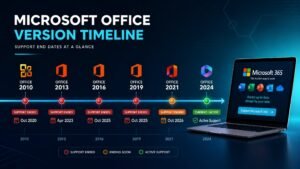
The wrinkle: perpetual Office for Mac officially supports the three most recent versions of macOS at any time. In practice the apps keep running past that, but on a brand-new MacBook you plan to keep for seven years, know that Office 2024’s support window runs to October 2029 — a fair horizon, and our what’s new in Office 2024 guide covers what you get in the current generation.
Which should you buy?
Student or home MacBook
Home & Student. Apple Mail handles casual email fine, and you save the Outlook premium for people who need it. One payment, done through graduation and beyond.
Work MacBook
Home & Business — Outlook is the whole difference and it’s worth it the first time your work calendar, mail and contacts live in one place. This is the edition most buyers in our Office for Mac range land on.
Mixed household — a MacBook and a Windows PC
Buy per-machine rather than stretching one subscription: a Mac license for the Mac, a Windows license for the PC, from the same store, usually still cheaper over a few years than one family subscription — and nobody’s apps stop working if a renewal lapses.
Heavy OneDrive user, iPad included in the workflow
Honestly: Microsoft 365. Cloud storage plus iPad apps plus Mac apps under one plan is the case the subscription was built for, and pretending otherwise would just cost you our credibility.
Installing and activating on a Mac
Same rhythm as Windows, ten minutes end to end: buy the key, get the email within minutes, download from the official Microsoft link, install, sign in or enter the key when prompted. The activation guide covers the Mac path too, and support answers around the clock if macOS throws a curveball.
Microsoft Office for MacBook — FAQ
Does Office run natively on M-series MacBooks?
Yes — fully native on Apple Silicon since 2021, and it’s quick. No Rosetta translation, no emulation penalty, launch times that embarrass some Windows laptops.
Can I use one Office key on both a Mac and a Windows PC?
No — perpetual licenses are platform-specific. A Mac edition activates on macOS, a Windows edition on Windows. Buy the edition that matches each machine; mixing them up is the classic mistake this guide exists to prevent.
Will Office files from my Mac open correctly for Windows colleagues?
Identically. Format compatibility is total in both directions — fonts, formulas, layouts. Nobody can tell which platform a document came from.
Is Office for Mac cheaper as a one-time purchase from a key store?
Substantially — the same genuine-license resale economics apply on Mac as everywhere else. The honest explanation of why is worth five minutes if discounted keys still feel suspicious, and every Mac license at KYMakers carries the same 180-day money-back guarantee as the rest of the store.