Microsoft doesn’t make much noise about its one-time-purchase Office releases anymore — the marketing budget lives with the subscription. So when Office 2024 arrived, plenty of people missed it entirely, and plenty more assumed it was a minor refresh. It’s more interesting than that: Office 2024 is the version where the buy-once suite finally caught up with several years of features that had been subscription-only, wrapped in a faster, cleaner package.
Here’s what’s actually new in Office 2024, who genuinely benefits from each change, and — since we sell one-time Office licenses and have an obvious horse in this race — an honest read on whether it’s worth upgrading from what you have.
[image: Office 2024 apps open on a modern desktop showing the refreshed interface in light and dark mode]
The basics first
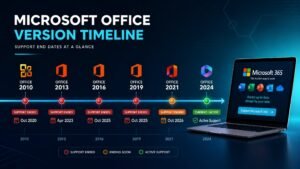
Office 2024 is a perpetual license: pay once, own it, no monthly meter. It installs the full desktop apps — Word, Excel, PowerPoint, OneNote, and in the Home & Business and Professional Plus editions, Outlook — and Microsoft supports it with security updates until October 2029. It runs on Windows 10, Windows 11, and macOS. Files are fully compatible in both directions with older versions and with Microsoft 365.
What’s new in Excel (the headline act)
Excel got the biggest share of genuinely new machinery, and two functions matter more than everything else combined:
- GROUPBY and PIVOTBY. These summarize data with a single formula — grouping, aggregating and sorting in one step, live-updating as the data changes. If you’ve ever rebuilt the same pivot table every Monday morning, this is that chore reduced to one line. It’s the kind of feature that quietly saves an hour a week forever.
- Dynamic arrays, matured. Formulas that “spill” results across cells now behave predictably across the suite of functions — FILTER, SORT, UNIQUE and friends — so you can build small reporting systems without a single copy-dragged formula.
Add faster recalculation on large workbooks (noticeably faster on files in the tens of thousands of rows) and IMAGE support in cells, and Excel 2024 is the strongest single reason this version exists. Our Office 2021 vs 2024 comparison goes deeper on exactly what 2021 lacks.
What’s new everywhere else
A cleaner, faster interface
The whole suite wears the Windows 11 design language now — rounded corners, refreshed iconography, and a proper dark mode in Word that finally darkens the page itself, not just the toolbars. Cosmetic? Partly. But the apps also open faster and feel lighter on modest hardware, which matters on the five-year-old laptops a lot of Office actually runs on.
PowerPoint
Better presenter tools, including refined Cameo camera-feed integration and improved recording of narrated decks. Useful if you present; invisible if you don’t.
Word and Outlook
Quality-of-life across the board: smoother co-editing when a document lives in the cloud, better accessibility checking built into the flow, and — worth saying plainly — Office 2024 keeps classic desktop Outlook. If you’ve read about Microsoft pushing everyone to the “new Outlook” web-style app, the perpetual suite is quietly the version that lets you keep the full-fat classic client.
What Office 2024 deliberately doesn’t include
Copilot. Microsoft’s AI assistant stays subscription-only, full stop. If AI-in-your-documents is the feature you’re buying for, Office 2024 isn’t your product — Microsoft 365 is, and our one-time purchase vs Microsoft 365 guide lays out that trade honestly. If you’ve lived happily without it, nothing here will make you miss it.
App by app: what daily use actually feels like
Word 2024
Word’s changes are the quiet kind you notice after a week rather than a minute. The dark mode finally extends to the page itself, which late-night writers will appreciate the first evening they use it — white-hot document canvases at midnight were one of those irritations everyone had simply accepted. Document recovery got more graceful: crashes are rarer to begin with and the recovered-file experience no longer feels like an archaeology dig. Co-authoring, when a document lives in OneDrive or SharePoint, is smoother and shows collaborators’ cursors with less lag. And underneath, documents with heavy images and tracked changes scroll noticeably better on modest hardware. None of this remakes Word — Word was finished, in the best sense, years ago. What 2024 does is sand off the friction points, and friction is what you actually feel in an app you use four hours a day.
Excel 2024
We covered GROUPBY and PIVOTBY above, but the everyday story is broader. The dynamic-array engine that arrived in the subscription world is now fully native here: FILTER, SORT, UNIQUE, SEQUENCE and friends all spill results naturally, which changes how you build sheets — less copy-dragging formulas down columns, more writing one formula that produces a living table. IMAGE-in-cell means product photos, logos and diagrams can live inside the grid properly instead of floating over it. Recalculation on large models is genuinely faster — the kind of speedup you measure in “the progress bar stopped appearing”. And stability under multi-sheet, multi-query workloads improved enough that the daily-driver crowd — accountants, analysts, inventory managers — will feel it. If one app justifies this generation, it’s this one.
PowerPoint 2024
Presenters get the most visible additions. Cameo puts your camera feed directly inside slides, so you present from within the deck rather than floating in a corner of a call window. Recording narrated presentations — now a standard way to distribute training and pitches — has a proper studio flow with per-slide retakes. Export to video is cleaner, and SVG and modern-media handling means design-heavy decks stop rasterizing into fuzz. For the once-a-quarter presenter, it’s all pleasant; for teachers, trainers and salespeople, the recording flow alone can be the reason to upgrade.
Outlook 2024 — and the elephant in the inbox
The headline is what didn’t happen: perpetual Office 2024 ships classic Outlook, the full desktop client with decades of muscle memory, offline archives, and every rule and plugin behavior intact. Microsoft’s “new Outlook” — the lighter, web-based replacement being pushed hard elsewhere — is optional here, not imposed. Search got faster, shared calendars sync more reliably, and profiles with years of accumulated mail load better. If your work life lives in Outlook, this stability-first approach is exactly what you want from a buy-once product: the tool you know, patched and quicker, with nobody moving your furniture.
OneNote, Access and Publisher
OneNote continues as the free-form notebook it’s always been, with ink and sync improvements. Access — Windows-only, Professional Plus tier — keeps powering the small-business databases the world quietly runs on, unchanged in mission. Publisher deserves a plain warning: Microsoft has announced its retirement from the subscription world, making the perpetual suite its long-term retirement home. If Publisher matters to your workflow, a perpetual license is now the only sensible way to hold onto it.
What deliberately didn’t change (and why that’s a feature)
A buy-once suite sells stability, and Office 2024 honors that: the ribbon is where you left it, file formats are unchanged since 2007, keyboard shortcuts survived untouched, and templates, macros and add-ins from your old version carry across. VBA macros — the automation layer thousands of businesses secretly depend on — run as they always have. This is worth stating because upgrade anxiety is the real barrier for most Office buyers: the fear that fifteen years of habits get reset. They don’t. An Office 2016 user sits down at Office 2024 and simply finds everything faster, prettier and patched — the learning curve is measured in minutes, and it’s mostly spent admiring dark mode.
So is Office 2024 worth it?
Coming from Office 2016 or 2019
Yes, clearly. Those versions are at or past the end of their support life, and the jump in Excel alone spans three generations of features. This is the easy case: upgrade, feel the difference the first week. The Office 2024 Professional Plus key is the full-suite route, delivered by email in minutes from KYMakers.
Coming from Office 2021
Honest answer: it depends on Excel. Heavy spreadsheet users get real daily value from GROUPBY, PIVOTBY and the performance gains. Everyone else can reasonably ride 2021 until its support ends in October 2026 — that’s the date to put in your calendar, and the comparison linked above helps you decide before it hits.
Considering Microsoft 365 instead
If you need a terabyte of OneDrive, installs on many devices, and always-latest features including Copilot — subscribe. If you need Word, Excel, PowerPoint and Outlook to work every day on one or a few PCs with no recurring bill, the one-time license wins the arithmetic by a wide margin over any multi-year horizon. Browse the whole Office 2024 range to match editions.
Office 2024 editions: which box actually fits you
“Office 2024” is a family, not a single product, and edition confusion is the number-one pre-sale question we field. Here’s the lineup translated out of Microsoft-speak:
| Edition | Apps included | Built for |
|---|---|---|
| Home (Home & Student) | Word, Excel, PowerPoint, OneNote | Households and students — writing, budgets, coursework, no work email |
| Home & Business | The above plus Outlook | Anyone whose calendar and email run their day — most working buyers |
| Professional Plus | Word, Excel, PowerPoint, OneNote, Outlook, Access, Publisher | Power users and businesses wanting the complete toolkit on Windows |
| Standard / LTSC | Volume-licensing editions of the same apps | Organizations buying in bulk with long-servicing needs |
The honest buying logic: if Outlook isn’t in your life, Home suffices. If it is, Home & Business. If you want everything — including Access for databases — the Professional Plus key is the full-fat Windows edition and, through license resale pricing, usually costs less than the mid-tier does at retail. Mac buyers: Pro Plus is Windows-only; the Mac lineup tops out at Home & Business, and our Office for Mac guide covers that side completely. Outfitting several machines? The 5-PC pack exists so a small office doesn’t pay five retail stickers.
System requirements: will Office 2024 run on your machine?
Almost certainly yes — this is the least demanding “requirements” section you’ll read all year. Office 2024 wants Windows 10 or Windows 11 (or the three latest macOS versions), 4 GB of RAM, and about 4 GB of disk space. Any PC from the mid-2010s onward clears it without noticing. Two practical notes hide in the fine print, though. First, Office 2024 dropped support for Windows 8.1 and earlier — a machine that old needs its Windows sorted first, and our which-Windows check plus the end-of-support guide map that path. Second, an SSD makes a bigger difference to Office’s feel than any CPU upgrade: the famous “Excel opens instantly” experience is mostly storage.
Office 2024 vs 2021 vs 2019 vs 2016: the generational ladder
| Capability | 2016 | 2019 | 2021 | 2024 |
|---|---|---|---|---|
| Security updates today | No — ended | No — ended | Yes, until October 2026 | Yes, until October 2029 |
| XLOOKUP and dynamic arrays in Excel | No | No | Yes | Yes |
| GROUPBY / PIVOTBY | No | No | No | Yes |
| Real-time co-authoring | No | Partial | Yes | Yes, improved |
| Dark mode incl. page canvas | No | No | Partial | Yes |
| Windows 11-style interface | No | No | Partial | Yes |
| Runs on current Windows | Yes | Yes | Yes | Yes |
The ladder tells a clean story. From 2016 or 2019, you’re not just missing features — you’re unpatched, and Office opens hostile email attachments for a living. From 2021, you’re patched until next October and the jump is about Excel and polish; the dedicated 2021 vs 2024 comparison weighs that call honestly. Nobody needs to climb the ladder rung by rung, either: 2016 to 2024 is one purchase, not three.
Installing and activating Office 2024: the ten-minute walkthrough
- Order your edition — the key and official download link arrive by email within minutes.
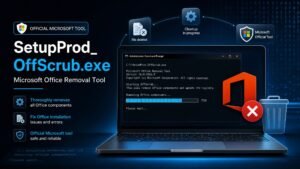
- Uninstall any old Office first (Settings, Apps) — versions generally dislike cohabiting, and removing 2016 before installing 2024 prevents the strange duplicate-app limbo. Your documents are never inside Office; uninstalling touches nothing you wrote.
- Download from the official Microsoft link in your delivery email — never a third-party mirror.
- Run the installer, let it finish, open Word, and enter your product key when prompted (or sign in, depending on the flow your edition uses).
- Verify: File, Account should show your edition as activated. Done — the activation guide has screenshots for every step and every hiccup, and support answers around the clock if one appears.
[image: Office 2024 installation progress screen with the activation confirmation shown in Word account settings]
Upgrading from your current version: the path from each starting point
From Office 2016 or 2019
Treat this as a fresh start rather than an upgrade — uninstall the old suite, install 2024, activate, done in twenty minutes. There’s no in-place upgrade mechanism between perpetual generations and you don’t want one; a clean install avoids inheriting a decade of add-in debris. Your files, templates and custom dictionaries live outside the suite and survive automatically, though it’s worth exporting your Outlook signatures and any custom ribbon layouts first (File, Options, Customize Ribbon, Export). Expect the interface to feel like the same house after very good renovations: everything where you remember it, all of it nicer.
From Office 2021
Identical mechanics, calmer timeline. You’re patched until October 2026, so this is a when-it-suits-you move rather than an emergency. The pragmatic play many businesses choose: upgrade the heavy Excel users now (they collect the real gains) and migrate everyone else as the 2026 support deadline approaches. Keys don’t expire, so buying at a good moment and installing at a convenient one is a legitimate strategy.
From Microsoft 365
Moving from subscription to ownership is the one path with a feature question attached: you’ll trade always-newest features and OneDrive storage for freedom from the recurring bill. Files are untouched — they’re yours regardless — and the desktop apps feel near-identical day to day. Cancel the subscription only after the perpetual suite is installed and activated, and pull anything you care about out of OneDrive’s cloud-only storage first. The full decision framework is in our one-time vs 365 comparison; the short version is that most people paying monthly for Word and Excel on one PC are overpaying for storage they don’t fill and features they never open.
Running old and new side by side
Technically possible, practically cursed — file associations fight, updates tangle, and Outlook flat-out refuses two versions. The supported answer is one Office generation per machine. If you need a transition period, run the old suite on the old PC and the new one on the new; that configuration is peaceful because the armies never meet.
The security argument nobody markets
Here’s the least glamorous, most defensible reason Office 2024 exists in a world of unpatched 2016 installs: Office is a primary attack surface. Malicious email attachments, poisoned macros and booby-trapped documents are the front door of most small-business breaches, and Microsoft patches a steady stream of Office vulnerabilities — in supported versions. An Office 2016 machine opening clients’ attachments in 2026 is doing security theater: the antivirus scans, the firewall hums, and the actual application parsing hostile files hasn’t seen a patch in years. Moving to a supported generation isn’t a luxury upgrade; for anything that touches outside email, it’s the cheapest security control you can buy. And because it’s a one-time purchase, the cost divides across five-plus years into something smaller than most businesses’ monthly coffee line.
Getting the most from 2024: three features worth learning on day one
- GROUPBY in practice. Sales list with columns for region and amount? =GROUPBY(A2:A500, C2:C500, SUM) produces a live regional summary — one cell, no pivot wizard, updates itself as rows change. Spend ten minutes with GROUPBY and PIVOTBY on your own data and Monday reporting changes shape permanently.
- Dark mode, fully. Word: View tab, Switch Modes — the canvas follows. Pair it with Windows 11’s dark theme for a coherent late-night setup that your eyes will bill you less for.
- PowerPoint Cameo + Record. Build the deck, add your camera feed as an object on the slides, hit Record, and export a narrated video without any external software. The first time you send a five-minute recorded walkthrough instead of scheduling a meeting, this feature pays for the suite.
Buying Office 2024 without overpaying
Retail pricing for Office has always carried a brand tax, and the perpetual editions inherit it — which is precisely where license resale earns its keep. The mechanics are the ones we document openly in our guide to cheap Microsoft keys: volume and regional pricing produce genuine licenses below sticker, resellers pass most of the gap to you, and the license that reaches your inbox activates against Microsoft’s servers identically to the shrink-wrapped version. The vetting rules from our buyer’s checklist apply to Office exactly as to Windows: real guarantee, reachable humans, official download links. At KYMakers that means the key in minutes, the download from Microsoft, 180 days of money-back cover, and support that answers at 2am — the whole apparatus this article’s honesty is meant to earn your trust in.
Who gets what from Office 2024 — five real users
The student
Essays, group projects shared over OneDrive links, the occasional data assignment. Home edition covers all of it, dark mode earns its keep during exam season, and the one-time price beats four years of subscription arithmetic before first year ends. The co-authoring improvements matter more than students expect — group assignments genuinely happen in shared documents now, and 2024 handles simultaneous editors without the ghost-cursor chaos of older versions.
The freelancer
Invoices in Word, project tracking in Excel, proposals in PowerPoint, client email in Outlook — this is the Home & Business profile exactly. The suite is a business expense that never recurs, which freelancers with lumpy income appreciate more than anyone. And the professional-polish details — modern templates, clean PDF export, presentable recorded pitches — are quietly client-facing features: your documents are part of your brand.
The small business, five to fifty seats
The math scales: multiply any subscription by seat count and by years, and the one-time model’s advantage stops being subtle. Deployment is boring in the good way — same installer, per-machine keys, no license server, no renewal calendar, no seat audit anxiety. Mixed fleets work fine (2024 on new machines, 2021 riding until 2026 elsewhere), files flow identically, and the ordering process takes minutes per seat rather than a procurement cycle.
The analyst or accountant
You already know: GROUPBY, PIVOTBY, spilled arrays, faster recalc on the forty-tab monster you inherit every quarter. This is the user 2024 was built for, and the productivity delta is measured in hours per week, not minutes. Pro Plus tier, because Access tends to lurk somewhere in these workflows too.
The family PC
Homework, household budgets, the yearly holiday letter. Home edition, installed once, ignored for years — the appliance model of software ownership. The honest note: if the household genuinely lives across many devices with shared cloud storage, the family subscription earns consideration; our comparison guide draws that line without salesmanship.
After the install: the three hiccups people actually hit
- “Unlicensed Product” in the title bar. Almost always a sign-in or key-entry step that got skipped, occasionally a clock or connectivity issue during activation. File, Account, Change Product Key re-runs the moment; the activation guide covers the stubborn variants, and support handles the rest around the clock.
- Old shortcuts opening nothing. Windows shortcuts sometimes point at the uninstalled version’s paths. Pin fresh ones from the Start menu and the ghosts are gone.
- An add-in from the 2016 era misbehaving. Most add-ins install cleanly into 2024, but a genuinely ancient one may need its own update from its vendor. File, Options, Add-ins shows what’s loaded; disable-and-test isolates a troublemaker in two minutes.
The bigger picture: why perpetual Office still exists at all
It’s worth understanding why this product line survives when Microsoft would visibly prefer everyone subscribed. The answer is that a huge, stubborn, unglamorous share of the world — small businesses, governments, schools, offline environments, and everyone philosophically allergic to renting software — simply refuses to put Word on a monthly meter. Every few years Microsoft weighs that audience against its subscription ambitions, and every few years the perpetual suite ships again: 2016, 2019, 2021, 2024, each officially “possibly the last one” in the rumor mill, each followed by another. Buying Office 2024 is joining the largest quiet installed base in software — the people whose apps just work, whose costs are already sunk, and whose upgrade schedule is set by their needs rather than a billing cycle. There are worse clubs.
File compatibility, settled properly
Because it’s the most-asked question in different clothes, let’s retire it thoroughly. The Office file formats — .docx, .xlsx, .pptx — were standardized back in 2007 and have not changed since. A document created in Office 2024 opens byte-for-byte correctly in 2021, 2019, 2016, in Microsoft 365, on Mac, on the web apps, and on phones. The reverse is equally true. Fonts embed, formulas compute, track-changes survive, macros travel (desktop to desktop). The only genuine edge case: a spreadsheet using a brand-new function like GROUPBY, opened in an older Excel, shows the calculated values with a compatibility note rather than a live formula — data intact, machinery visible only on modern versions. In fifteen years of these formats, “the file won’t open because of your Office version” has essentially become an urban legend; whatever caused your colleague’s problem, it wasn’t the generation gap.
The compatibility question that does deserve attention is platform: Windows Pro Plus editions versus the Mac lineup differ in included apps (no Access or Publisher on macOS), and mixed households should buy per-platform deliberately — our Office for Mac & MacBook guide exists precisely for that fork in the road.
A short history, because the pattern is the buying advice
Office 2016 arrived when the subscription push began in earnest, and skeptics called it the last perpetual version. Office 2019 followed — smaller, quieter, also “the last one”. Office 2021 came with genuinely good Excel upgrades and the same eulogy pre-written. Office 2024 makes it four generations of a product that keeps outliving its own obituary, because the demand it serves — pay once, own it, run it for years — doesn’t diminish just because a subscription would be more convenient to sell. Read the pattern as a buyer: the perpetual line is on a roughly three-year cadence, each release inherits the subscription world’s matured features, and the smart purchase is always the current generation at a resale price rather than the previous one at a discount that support-math cancels out. That’s not marketing; it’s the last decade’s actual scoreboard.
Switching from Microsoft 365: what you’ll miss, and the workarounds
Fairness demands the reverse checklist too. Leave the subscription for Office 2024 and you give up: OneDrive’s terabyte (workaround: any cloud storage — the free tiers of several services cover typical document loads, and local backups were always the wiser habit anyway), Copilot AI drafting (workaround: the free web chatbots handle draft-and-paste duty for the occasional user), always-newest features (workaround: none, and most people can’t name a feature they’re waiting for), and multi-device installs (workaround: buy per-machine — resale pricing makes two perpetual licenses cheaper than most single subscription years). What you get back: a bill that stops existing. Run your own twelve-month total honestly and the comparison usually ends there — which is why the subscription’s marketing leads with features and never with arithmetic.
Office 2024 vs the free alternatives — the fair fight
Any honest upgrade article owes you this section: LibreOffice is free, Google’s web suite is free, and for some people they’re genuinely enough. Where the free options hold up: light writing, simple sheets, documents that never leave your own ecosystem. Where they cost you: compatibility at the edges (complex Word formatting, Excel models with real formulas, tracked-changes documents from clients arrive slightly wrong just often enough to matter), offline depth in Google’s case, and Excel’s power features — nothing free approaches the dynamic-array-and-GROUPBY tier, and VBA workbooks that run businesses simply don’t run elsewhere. The pattern we see in practice: people whose documents are private stay happily free; people whose documents are professional currency — sent to clients, bosses, courts, accountants — end up on real Office, because “it opened slightly wrong” is not a sentence you want attached to your invoice. A one-time license is the cheapest the real thing has ever been, which has quietly dissolved most of the old price argument for making do.
[image: side by side comparison of the same styled document opened in Office 2024 and a free office suite showing formatting differences]
Office 2024 new features — FAQ
Does Office 2024 require a subscription?
No. It’s a one-time purchase with no recurring fee — that’s the entire point of the product line. It activates once against Microsoft’s servers and stays yours; the activation guide shows the ten-minute process.
Can Office 2024 open files from older versions and Microsoft 365?
Fully, in both directions. The file formats haven’t changed — a .docx or .xlsx is identical across 2016, 2019, 2021, 2024 and 365. Nobody you exchange files with will know or care which you run.
How long will Office 2024 be supported?
Security updates run until October 2029. History says the apps keep working fine well past that date — but 2029 is the horizon for patches, which is what matters for anything opening email attachments.
Does Office 2024 run on Windows 10?
Yes — Windows 10 and 11 both. Just remember Windows 10 has its own support countdown; our Windows 10 end of support guide covers how to plan both upgrades in one move instead of two.
Is Office 2024 a subscription in disguise? Any hidden renewals?
None. One payment, perpetual license, no renewal date anywhere in the product. The only calendar attached is the security-update horizon (October 2029), and the apps keep working past it — 2016 installs still run today, seven years past their own.
Can I move my Office 2024 license to a new computer later?
Retail-type perpetual licenses support moving between your own machines — deactivate by uninstalling on the old PC, install and re-activate on the new one. Keep your delivery email permanently; it’s your proof and your key in one place, and our support can walk a transfer through if activation hesitates.
Does Office 2024 include Teams?
No — Teams is a separate (free-tier available) app in the subscription world. The perpetual suite is the classic desktop apps; anything meeting-shaped installs separately and coexists fine.
Will Office 2024 get new features over time?
No — security patches yes, new features no. The feature set you buy is the feature set you keep; that frozen-in-amber quality is the trade against the subscription and, for stability-minded users, half the appeal.
What happens to my old Office license after I upgrade?
Nothing dramatic — it remains yours. Retire it, or redeploy it on a low-stakes offline machine if its support life suits that. Just avoid running two generations on one PC.
Is there an Office 2024 free trial?
Not for the perpetual editions — Microsoft’s trials funnel into the subscription. The closest equivalents: the free web versions of Word and Excel to sample the interface, and a money-back guarantee doing the real risk-removal — our 180 days covers the actual “did I buy right” question with room to spare.
Office 2024 or wait for Office 2027 (or whatever comes next)?
The next perpetual release is unannounced, years out if the cadence holds, and waiting means running unpatched or subscribing meanwhile. Buy the current generation when your need is current — the ladder table above shows generations age gracefully, and October 2029 is a long runway. Waiting for software that hasn’t been announced is how people spend three years paying monthly for what one payment would have covered.
Where do I check that my copy is genuine after activating?
File, Account in any app: your edition name and “Product Activated” is the confirmation. Activation succeeded against Microsoft’s own servers — that’s the entire genuineness test, passed. Anything from KYMakers that ever fails it becomes our problem under the guarantee, not yours.
We’re a small business — what’s the sane rollout order?
A rollout that has worked for hundreds of our business buyers: inventory first (note each machine’s current Office version and its heaviest user), upgrade the analysts and finance seats to 2024 immediately (they repay the upgrade in saved hours fastest), schedule everyone still on 2016/2019 next (they’re unpatched — that’s a security queue, not a convenience one), and let 2021 seats ride until a natural moment before October 2026. Buy keys as you deploy rather than all upfront if cash flow matters — delivery takes minutes, so stock has no value — or take a multi-seat pack when the count justifies it. Keep every delivery email in a shared licensing folder; future-you doing a machine swap will send thanks. Total ceremony per machine: under half an hour, mostly unattended.
The bottom line in three sentences?
Office 2024 is the best version of the buy-once suite Microsoft has shipped, with Excel’s new engine as the star, classic Outlook preserved, and support until October 2029. Upgrade now from anything older than 2021; upgrade from 2021 when Excel matters to you or when its 2026 support deadline gets close. Pay resale prices rather than retail — the license is identical, the difference funds nothing but the sticker — and keep the delivery email like the ownership document it is.
Three questions our support inbox answers weekly
“I bought Home & Business but I actually need Access — am I stuck?” No: contact support before or shortly after activation and edition swaps get sorted; it’s routine and it’s what pre-sale questions are for. The FAQ page heads most of these off, but nobody reads every page before buying, and that’s fine — that’s why humans answer the mailbox.
“My PC is from 2013 — will 2024 crawl?” It will run, and honestly better than you fear: 2024’s performance work helps low-end hardware most. But pair a machine that old with its other deadlines — it likely fails Windows 11’s checks too, and there’s a coherent decision to make about the whole box before investing in per-app upgrades. Sometimes the right Office upgrade is a refurbished PC with both licenses fresh.
“Can I gift a key or buy for someone else’s machine?” Completely — a key is a string in an email until it’s activated, so forwarding it to a family member, a new hire, or the friend whose 2016 install you’ve been quietly judging works perfectly. The license belongs to whoever activates it; the 180-day guarantee travels with the order. Some of our steadiest customers are the family’s unofficial IT department buying in twos and threes — the same instinct that made you read five thousand words on Office is the one that makes you the person everyone calls, and we see you.
Where does this leave the Office 2024 decision?
Somewhere refreshingly simple, after five thousand words of detail. The suite is mature, the new Excel machinery is genuinely worth having, the support runway reaches 2029, and the one-time price — at resale rates — undercuts a single year of subscription for software you’ll run for five or more. The decision tree collapses to three branches: unpatched old version means upgrade now for security alone; happy 2021 user means calendar the 2026 deadline and move when Excel or timing tempts you; subscription payer means do the twelve-month math once, honestly, and act on what it says. Whichever branch is yours, the mechanics on this page — editions, install, activation, compatibility — turn the purchase into a twenty-minute errand, and the Office 2024 range at KYMakers is where the errand ends: genuine keys, minutes to your inbox, 180 days of cover, humans on call. That’s the whole story, told straight.
One last practical note for the bookmark-and-return readers: this article stays current with the perpetual line, and the related guides — 2021 vs 2024, one-time vs 365, the Mac edition guide and how ordering works — cover every neighboring decision. Between them, there is no Office question left that requires guessing, forum-diving, or trusting a stranger’s screenshot from 2019. Read what applies, skip what doesn’t, and buy exactly once.