
Looking for a stable, modern, and secure server OS with long-term support? Windows Server 2025 Standard brings improved security, better virtualization performance, and smarter storage—perfect for small and mid-sized businesses that need reliable on-prem power without Datacenter’s complexity or cost.
In this guide, you’ll learn how to:
- Verify system requirements
- Download official media
- Install Windows Server 2025 Standard (clean or upgrade-in-place)
- Activate & license correctly
Step 1: Quick Specs & Requirements
- Editions: Standard, Datacenter, Datacenter: Azure Edition (this guide focuses on Standard)
- CPU: x86-64 (64-bit) compatible; modern multi-core recommended
- RAM: 2 GB+ (Desktop Experience) / 512 MB (Server Core)
- Storage: 32 GB+ free (recommend 64 GB+ for roles/updates)
- Firmware/Security: UEFI 2.3.1c with Secure Boot and TPM 2.0 recommended (some features require them)
- Network: 1 Gbps NIC or better
Tip: For production, plan for redundancy (RAID/Storage Spaces), multiple NICs, and enough CPU/RAM headroom for future roles/VMs.
Step 2: Download Official Installation Media
- Go to the Microsoft Evaluation Center for Windows Server 2025
- Choose Standard and your language.
- Download the ISO (or VHDX for virtual environments).
- Verify checksums (optional but recommended).
Note: You will need a valid license key to convert the evaluation to a fully activated version. You can purchase a genuine Windows Server 2025 Standard License Key here: Buy License Key.
Step 3: Create Bootable Media (If Installing on Bare Metal)
- USB (8 GB+): Use Rufus or the Windows USB/DVD tool to write the ISO
- Virtualization: Mount the ISO directly in Hyper-V/VMware
Need help creating bootable media? Follow this guide: Creating a Bootable Windows USB Drive
Step 4: Install Windows Server 2025 Standard
- Boot from the USB/ISO and start setup
- Choose your preferred language, time, and keyboard settings.
- When prompted, enter your Windows Server 2025 Standard product key, or select I don’t have a product key to add it later.
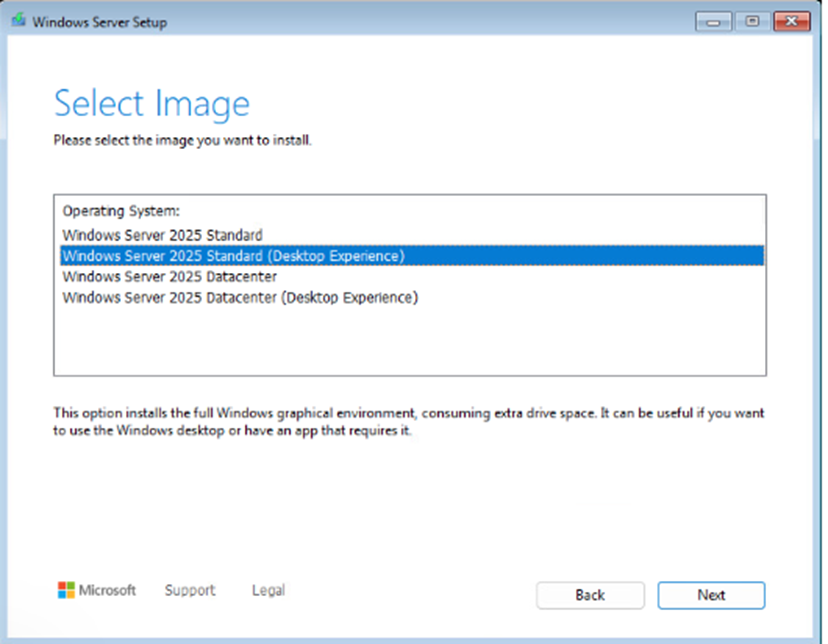
- Choose “Windows Server 2025 Standard (Desktop Experience)” for a GUI-based installation.
- Accept the license terms to continue.
- Partition disks (recommend separate OS/data volumes)
- Complete OOBE and set a strong local Administrator password
Step 5: Activate & License Correctly
- Open Settings > System > About > Change product key or upgrade your edition of Windows
- Enter your Windows Server 2025 Standard License Key
- Click Next and follow the prompts for activation
To convert from evaluation to full retail/volume version using DISM, open Command Prompt as Administrator and run:
DISM /online /Set-Edition:ServerStandard /ProductKey:XXXXX-XXXXX-XXXXX-XXXXX-XXXXX /AcceptEula
Then restart and complete activation.
Ready to Deploy Windows Server 2025 Standard?
If you need genuine licenses, CALs, or guidance on picking Standard vs. Datacenter, our team can help you size, procure, and activate correctly.
Click here to get your Microsoft Windows Server 2025 Standard Lifetime License Key
Need help now? Contact us with your server specs and role plans, and we’ll recommend the best licensing mix.